
Report phishing emails
What to do
Always report a suspected phishing email, even if you’re not sure.
How to do it
The quickest and easiest way to report a phishing email is to use Monash’s ‘report phishing’ button in Gmail. Currently this is only available on your desktop, not in the mobile app. If it isn't available, forward the email from your Monash or affiliate account to phishing@monash.edu.
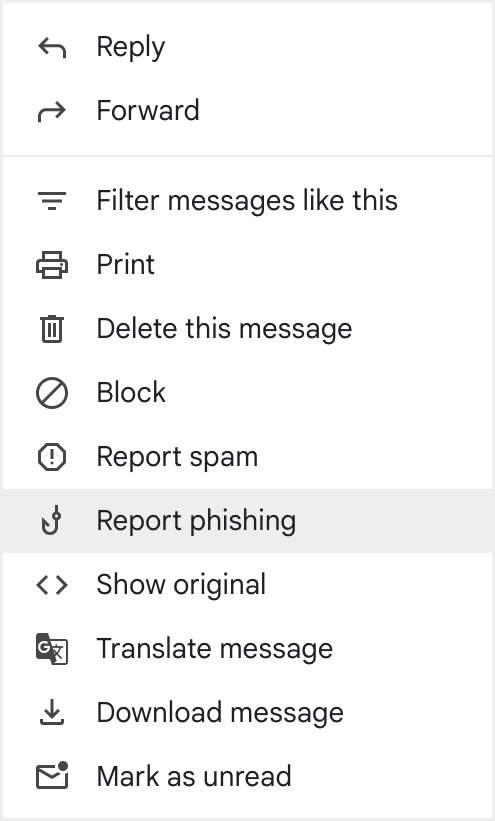
To use the 'report phishing' button, follow these steps:
- Click the three dots at the top right, next to the reply icon (More will appear when you hover over this).

- Click “Report phishing” from the drop down list.
- Click the “Report Phishing Message” button.
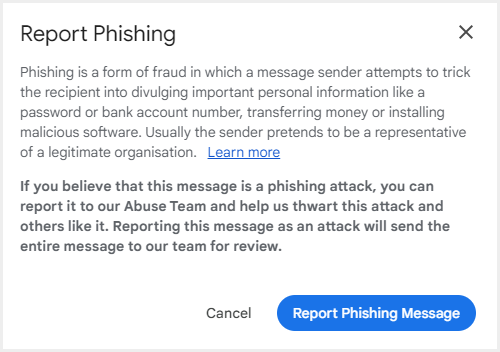
You’ll receive a response from the Phishing Analysis Service (no-reply@e105.e.monash.edu) and the email will be evaluated as safe, spam or malicious. No further action is required.
If you need help using this option, staff can watch our video tutorial on Workplace (staff login required).
If you’re still having trouble, report it using our incident notification form or contact the cyber team at cyberteam@monash.edu.
Why it matters
Recognising a phishing email protects you, reporting a phishing email protects everyone. A couple of button clicks is all it takes.
If you spot a phishing email in your inbox, reporting it will also remove it from other people’s Monash inboxes.