
Connect to eduroam wi-fi: iPhone and iPad
Students
Staff
Research students
Connect to eduroam wi-fi: iPhone and iPad
The eduroam wireless network is available on-campus to all staff and students. It’s also available in other university campuses around the world.
For more general information about this network, see connect to eduroam wi-fi.
Check for a previous connection before starting
If you were previously connected to eduroam, you'll need to follow these two steps to remove the connection before reconnecting.
- Go to Wi-Fi settings.

- Select the information icon for eduroam and select Forget.

Connect and reconnect
- From the Home screen, tap Settings, then Wi-Fi.
- Tap eduroam.

- Enter your Monash email address as your username
Then enter your Monash password.
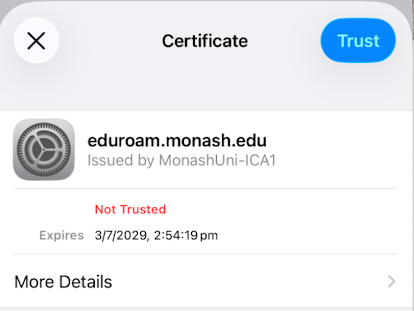
- On the Certificate pop‐up tap Trust.
- A tick next to eduroam network will appear confirming you're connected to the eduroam wireless service.
