
Microsoft Copilot
What is Microsoft Copilot?
Microsoft Copilot is a generative artificial intelligence (GenAI) program that has capabilities to generate text and images in response to user prompts. Copilot has different options for inputting prompts and information to enable you to tailor the response to suit your needs. Through experimenting with Copilot's options, you can produce the most appropriate responses that are best suited to your particular use case.
Making the most of Copilot
View




Using Copilot
Accessing Copilot
Monash University uses Copilot for work. To make sure your information is protected, it is recommended you log in using your Monash credentials. You can access Copilot through this page.
Navigating Copilot
Click on the hotspots below to learn more about the Copilot user interface.
NoteCopilot regularly has updates and introduces new features. Software you have installed on your computer may also interact with Copilot adding other features. If your version of Copilot looks different to the images here, this may be the reason. |
Prompting in Copilot
Like many GenAI programs, Copilot is a chat based program. This means that rather than writing a new prompt for each request, you can have a conversation with it if you want more information, or want to refine the response. Click on the hotspots below to understand more.
Creating Visuals
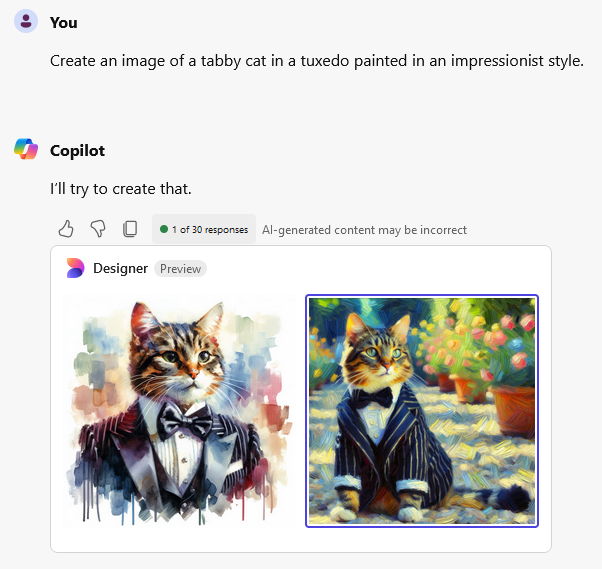
Microsoft Copilot enables you to create images. Using the Copilot conversations, you can ask the chatbot to generate images for you. Like a text response you can refine this response through conversation as well. Copilot uses a DALL-E plug in. You can then download the image, or images. See the example below.
NoteIf you are using generative artificial intelligence in your assessments, make certain that it is permitted for use, and allowed to be used in the way that you are using it. You will also need to acknowledge its use. |