
Bridges is available for Monash University staff and Graduate Research students (PhD and Masters by Research) to upload and share their research.
Masters by Coursework, Honours and Undergraduate students wishing to publish and share their research data can create an account with figshare.com.
No, logging in with your Monash account will create an account automatically.
No, your login is handled via Monash Single Sign On and your account details are never stored or shared with Figshare.
Bridges is the research data and theses repository for Monash University. It allows researchers to manage, store, share and publish their research data as citable research outputs with a DOI. Researchers control who can access their data in a variety of ways.
Bridges also holds the University’s collection of Doctoral and Masters by Research theses. Upon acceptance, the final version of the thesis is automatically added to Bridges from the Monash Graduate Research Office’s examination portal.
1. You can upgrade from the standard 2GB to 1TB storage for $139/year through Dropbox Pro, or $850/year through Dropbox Business for unlimited storage (minimum of 5 users).
Features | Bridges | Drop Box | Academia | Google | figshare |
|---|---|---|---|---|---|
Unlimited free private storage | Yes | No | Yes | No | |
Single file upload capacity | 5TB | Less than storage | 100MB | 5TB | 5GB |
Unlimited number of user published files | Yes | No | No | No | Yes |
Digital Object Identifiers (DOI) for user published files | Yes | No | No | No | Yes |
Upload any file format | Yes | Yes | No | Yes | Yes |
Accessible anywhere | Yes | Yes | Yes | Yes | Yes |
Login using Monash username and password | Yes | No | No | Yes | No |
Create secure, private collaborative projects | Yes | Yes | No | No | Yes |
Private link sharing | Yes | Yes | No | No | Yes |
Reserve a DOI for user published files | Yes | No | No | No | Yes |
User managed embargo settings for published files | Yes | No | No | No | Yes |
Group your content into collections | Yes | Yes | No | No | Yes |
Files stored securely on Monash University storage | Yes | No | No | No | No |
File recovery from secure backup | Yes | Yes | No | Yes | No |
All functions available for free | Yes | No | No | No | Yes |
Open data compliant for journal publication | Yes | No | No | No | No |
A Digital Object Identifier (DOI) acts as a persistent link to your research and is allocated at the point of publication. Monash University manages the DOIs in Bridges to ensure the link always points to your items and files, allowing them to be citable for the long-term.
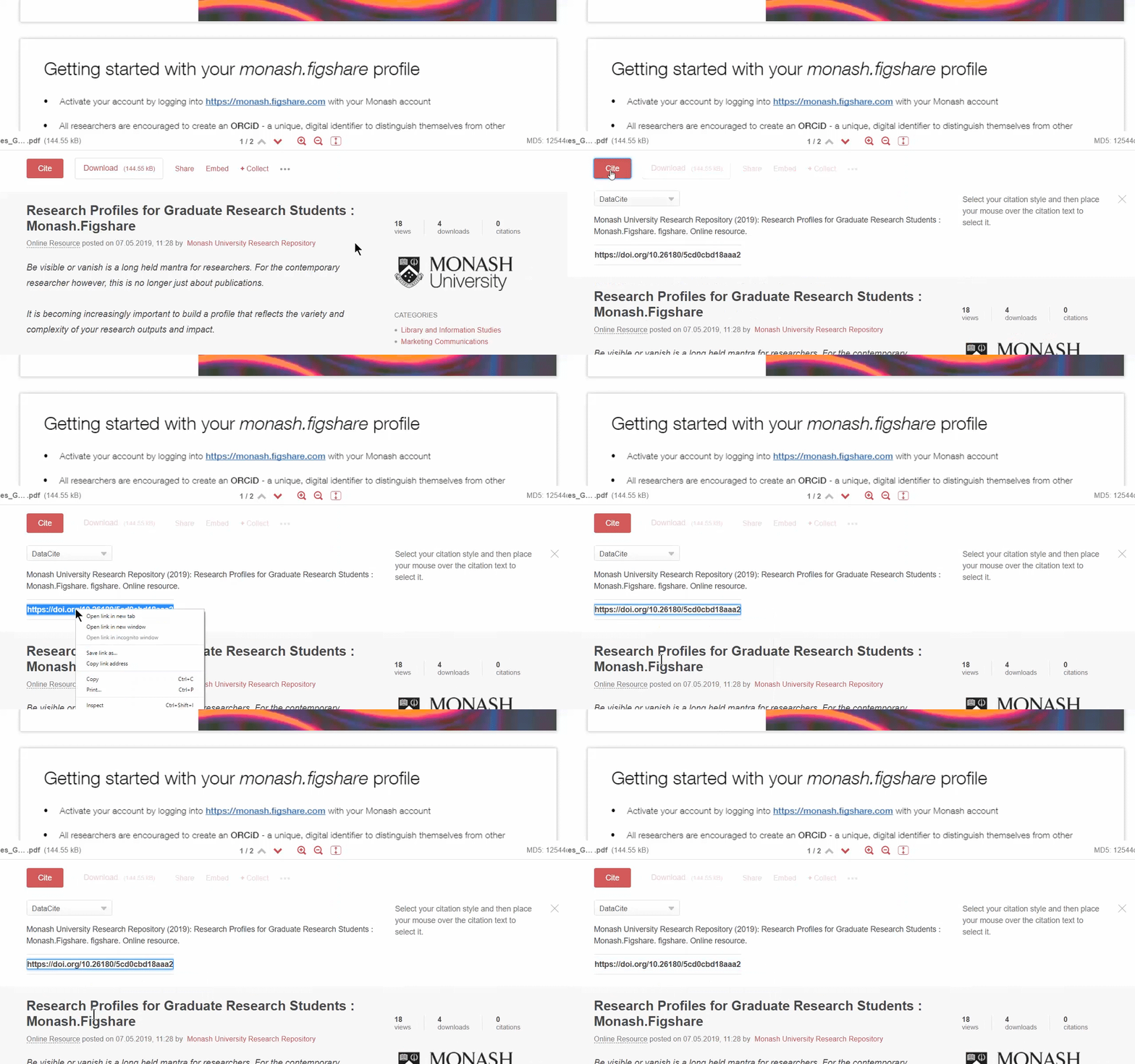
When you publish in Bridges, a DOI is automatically generated. To find the DOI on a published item simply click on the red "Cite" button.
When working with a draft record, click on 'Reserve Digital Object Identifier' located toward the end of the upload form. This creates a DOI that is reserved for your record, but is inactive. You can supply this DOI to publishers for inclusion in an upcoming paper, however the DOI will not become active until you return to your record and publish your file in Bridges.
Like item records, published Collections also support version control. Therefore, any changes you make to the collection will need to be reviewed and published. There are two types of changes that need to be published for them to be visible in the public record.
1. Updating items to their latest version
If you have added an item to your Collection that is later published with new changes (either by yourself or the owner of the record), you can choose to either have these new versions show in your collection, or to keep them as they were when you originally added them.
Updating items in your Collection to their latest published version.
If items in your collection have new versions, a banner notification will display at the top of your screen when you next access the Collection from your My data area of Bridges.
Once you have finished updating the Collection, you need to publish a new public version.
2. Publishing changes to a collection (e.g. after adding or removing items)
After publishing a Collection you can add additional, or remove existing, items. For this change to be visible in the public record you will need to publish a new version.

Bridges allows you to publish a record about your research without making the files publicly available. There are two ways of doing this - making the files confidential or applying an embargo.
Confidential files are a permanent state that can not be removed after publishing the record. There is also an option to provide a reason for the confidentiality that visitors to your published record (descriptive information only) will be able to see.
Embargoes
You can embargo the research output using a set period (1 month, 4 months, 6 months, 12 months or 2 years) or using the calendar to select a specific date. Regardless of which method you choose, the published record will clearly state that an embargo currently applies, and display the date the embargo ends. Once the embargo has elapsed the record will automatically revert to open access.
Applying an embargo allows you to provide the publisher (or other parties) with a DOI of where the data will be made available, without revealing any of your work until you are ready. You can always edit the embargo date as long as the item has not been published.
Bridges offers two types of embargo.
If an item has been published as open access in Bridges you will not be able to change it to confidential or add an embargo by editing the record.
If you have accidentally published data as open access and need assistance to correct this please contact librarians@monash.edu, supplying the following details:
Subject line: "Bridges unpublish request".
Description of the issue including:
A member of the Library will unpublish your record, reverting it back to draft mode. This will allow you to set your file as confidential or under embargo, and then republish the record.
Bridges is indexed by search engines like Google, as well as the Library’s Search, and Trove platforms. Information from DataCite suggests that figshare content gets 10x more views in Google than any of the other DataCite DOI minting repositories.
However, just how discoverable your research is will depend on you!
When you upload an item to Bridges you will be required to add some descriptive information, including Title, Authors, Categories, Keywords, and Description. By taking a moment to ensure you are including useful and meaningful information aimed at a wide ranging audience, you will significantly increase the likelihood that your research will be discovered and reused.
See our guide for some key tips: https://doi.org/10.26180/5cd0cc42762f7
All published records are publicly discoverable. Whether or not people can view and download your files will depend on whether you have published the files as open access, confidential, or with an embargo.
Only you can view your private research files before you publish. They are not visible or accessible by anyone else
However, if you are part of a Bridges Project, you can elect to allow project team members to view and download your unpublished research files. This is a feature designed to allow collaboration.
You can also allow others to view your private/unpublished records by using the Generate private link option and sharing it with specific people. You can revoke access via the private link at any time.
When an item is published in Bridges it is automatically assigned a DOI, which is a permanent link to the record. For this reason, you are unable to delete a published record.
If you have accidentally published data and need assistance please contact librarians@monash.edu, supplying the details listed below and a member of the team will assist as soon as possible:
Subject line: "Bridges unpublish request".
Description of the issue including:
A member of the Library will unpublish your record, reverting it back to draft mode.
Bridges supports versioning for both items and collections. When changes are made to a published record this may cause a new version of the record to be created, but older version are still accessible to anyone viewing your published record.
There are a couple of changes that trigger versioning. These rules are a bit different between items and collections.
Item records
Provided it is a public item, the following actions will trigger versioning when saving publicly:
Collections
Provided it is a public collection, the following actions will trigger versioning, when saving publicly:
All files uploaded through Bridges are stored at Monash University for long-term preservation and security.
There is no limit on the size of the files you are uploading. However, if you are uploading very large files you may need to request a larger storage allocation, and it may take a while for the upload to complete. As a general guide, it takes approximately 10 minutes to upload 1GB.
All users across Monash will start with 10GB of storage. If you are approaching the maximum of your initially allocated space, you can request more storage.
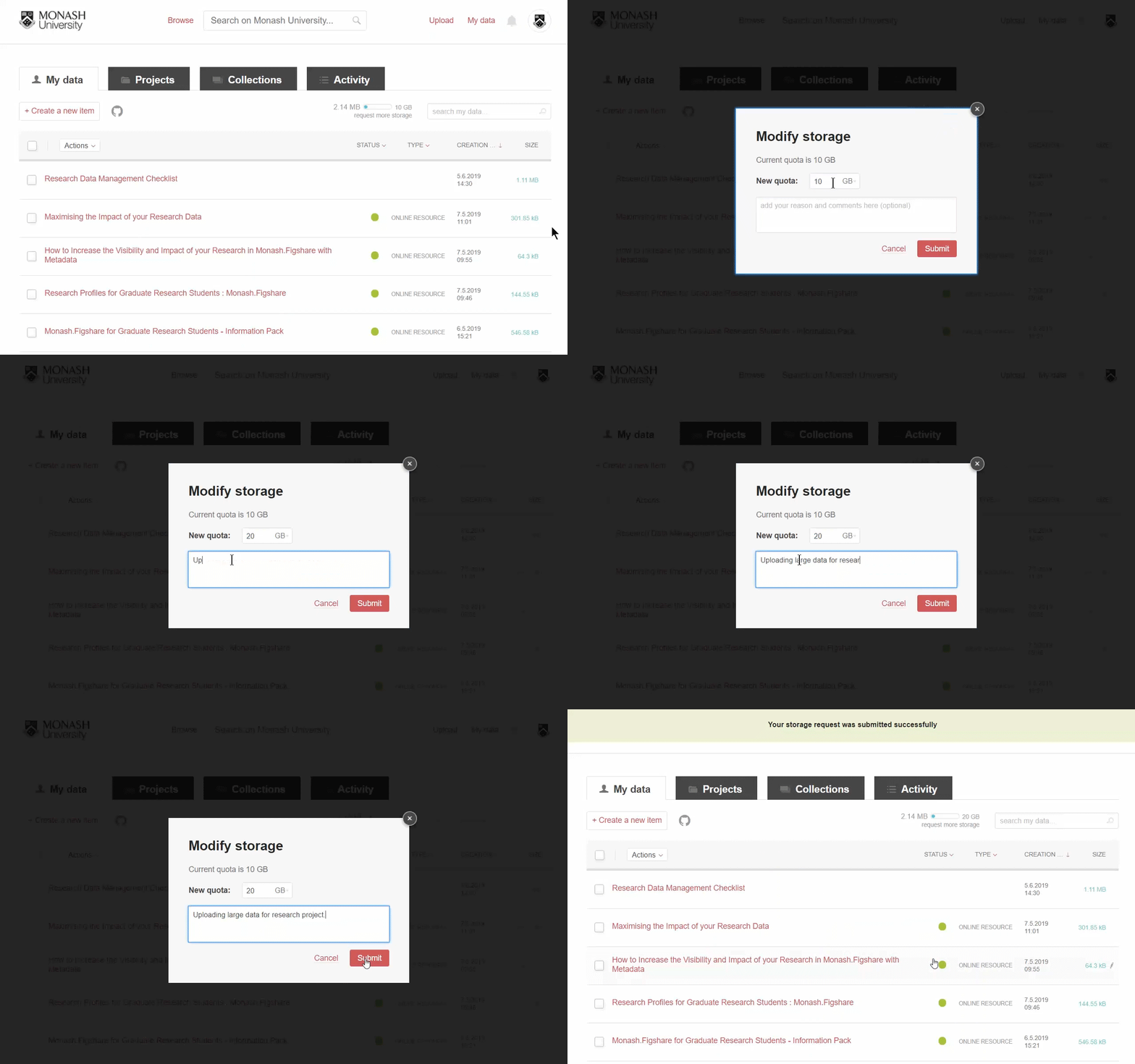
Log in and navigate to your My Data area. When hovering over the storage bar you will see the option to request more. Enter the total storage quota you require and any additional comments that may assist your administrator when deciding on the modified storage amount. Upon submitting the Library will be notified and will review your request. Once approved your new quota amount will be visible in the storage bar.
Bridges will not allow folders to be uploaded. However, it will allow zipped folders to be uploaded.
Alternately, when uploading to a record you can navigate to a folder, and select all the desired files together. The files will be uploaded separately within the one Bridges record.