
Access SARAH in the Riskware app
You can use the Riskware app to report hazards and incidents in SARAH, wherever you are. You can also:
- report a radioisotope disposal
- submit a building evacuation report
- record your workplace inspection findings and actions
- check your report status and outstanding tasks
- view your report and checklist submission history.
Watch the instructional video below to learn how to download the Riskware app, configure it for Monash, log in and start reporting from your mobile device.
It’s best you open this page on a laptop screen so you can scan the QR codes with your mobile device.
Step 1: Download the app for your device (iOS or Android)
Use the QR codes to download the Riskware app for your device, or tap to go straight to the App Store or Google Play.
Android


iOS


Step 2: Configure the app
In the app, select Scan QR code to configure (and allow permission for Riskware to access your camera). Scan the QR code below:
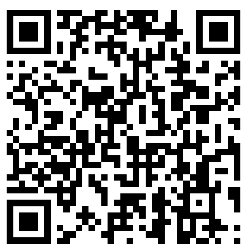
You should then see a pop-up message confirming your app has been configured.
Step 3: Log in with your Monash account
Once you’ve downloaded the app, select Scan QR code to configure.
In the Riskware app, tap Sign in and log in with your Monash account.
Step 4: Create a secure passcode
Enter a four-digital secure passcode you can use to sign into the app.
You’re now set up to use Riskware to report hazards and incidents in SARAH.
Need help?
For any queries, contact Health, Safety & Wellbeing at hsw@monash.edu