
Leganto
At a glance
Set up Leganto to give students access to your assigned readings in one place. Understand how the reading list link works in the Unit Information tab and follow the steps to activate it, including adjusting assessment settings and saving your changes.
Leganto allows students to access all of your assigned readings in one place. Setting up and sharing your reading lists in Leganto is supported by Library staff. The Leganto reading list link is automatically added in the Unit Information tab.
To activate the Leganto link with your unit:
- Navigate to the Unit information tab.

- Turn Edit mode is on in the top left corner.

- Navigate to the Leganto Reading List External Tool and click the three dots to access the drop-down menu and select Edit settings.

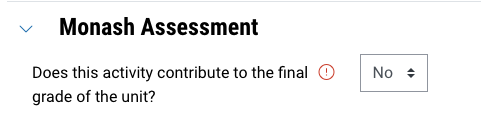
- Expand the Monash Assessment section, select No for "Does this activity contribute to the final grade of the unit?"
- Click Save and return to unit.
- Once you have done this, the external tool will grab your unit information (Unit Code / Location / Teaching Period) from the Callista block of the Moodle page and Leganto will now be set up to display the reading list for your unit.
NoteIf no reading list is displayed, you may need to set it up. Reading lists should be set up six to eight weeks before the semester starts and are managed by the library. For more information, see Reading lists for teaching staff. |