
Check Moodle for broken links
At a glance
Use Moodle's built-in link crawler robot to identify broken or inaccessible external and internal hyperlinks in your unit. Check this report during unit rollover or at any time throughout semester to catch links that may have stopped working since your unit was last updated.
Moodle has a built-in tool to check broken and inaccessible links for you in your units. Whenever you roll over your unit it is advised to use this tool to check if any external or internal hyperlinks have become inaccessible since the unit was last updated. It can also be used at any time throughout the semester.
- In the top menu of your unit, click Reports.

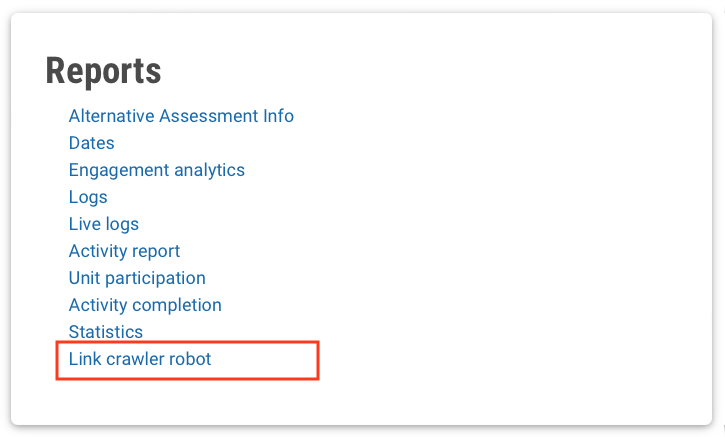
- From the Reports links, select Link crawler robot..
- Select the Broken Links tab to access the broken links report.
- The report indicates when the link was checked, a general indication of the priority of this error, what the error type was (404, 500, etc), the URL of the broken link, and the page it was linked from.
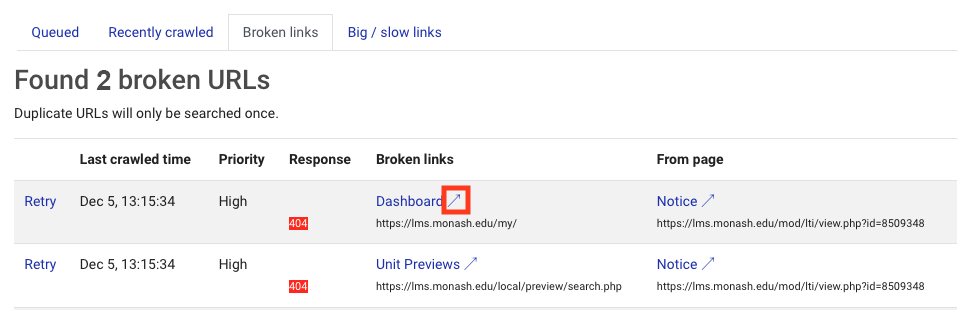
- You can follow the link to the broken URL or check where it was placed in the unit by clicking on the arrow next to the link name.
NoteWhen you first access this report, it may be empty. The data is refreshed on a loop after you first access the report, so there may be a delay in new links being validated. You can check back later for a full report. |