
Preview unit
At a glance
Preview your unit from a student's perspective by switching roles, so you can check how content, tasks and progress trackers will appear before students access them.
You can check how students view your unit by switching roles from Lecturer to Student. For example, you can preview the task tracker on the Unit Dashboard as it appears to students where tasks are assigned to the student role.
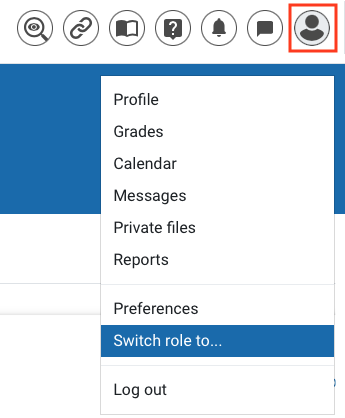
- Click on the User menu (your name in the top right hand corner).
- Click Switch role to...
- Select Student.
- To go back to the Lecturer role, click Return to my normal role in the User menu.
NoteSwitching to the student role will not always provide an accurate student view where access/visibility is also dependent on other factors, for example group overrides. |