
Feedback
Feedback
Feedback has a powerful impact on student learning outcomes and significantly influences students’ satisfaction. Feedback is a process of engaging students in reflection on their learning and enabling them to improve as they move forward (Henderson, Ajjawi, Boud & Molloy, 2019).

What is feedback?
Feedback might be formative and provided during learning to support improvement or summative and provided after an assessment to help students understand how well they did.
Research clearly shows that assessment feedback is a lynchpin to students’ effective decision making, and the basis of improved learning outcomes (Henderson et al., 2019).
-
Key principles of effective feedback
Learn about evidence-informed key principles for effective feedback, tailored to the higher education environment.
-
Implement feedback strategies
Learn strategies for integrating feedback into your teaching practice including feedback moderation for consistency, peer feedback, using rubrics, using exemplars as feedback, audio/video feedback and automated feedback.
-
Use Feed Forward for formative evaluation
Learn about Feed Forward practices to formalise feedback opportunities from students to educators conducted during the teaching period.
-
Survey students about their assessment preparation
Learn how to use the assessment survey to discover more about what students use to produce their assessments. You can use this feedback to support and assist students in the ethical and critical use of relevant tools and technologies in your own unit
-
Use dictation in Moodle
Learn how you can dictate notes and comments aloud into any text editor box using the in-built microphone, which will be converted into written text. This can save you time typing out lengthy comments or feedback.
Supporting your students
View

How to support your students
There are a number of ways that you can support your students in making sense of the feedback and actioning it to improve their learning.
Provide clear expectations around the assessment at the start
Clearly communicate the purpose and expectations for the assessment and the feedback before students begin the task. Students should know how and when they will receive the feedback, what they are expected to do with it, and how it connects to learning outcomes.
Feedback needs to be integrated into the learning practice
Feedback should be embedded within the learning process, not treated as an isolated event. Support student feedback literacy so that they have the necessary skills to recognise and apply feedback, as well as how to give feedback when required. Make time to engage students in discussion about the feedback they receive.
Create a safe space for communication around feedback
Students are more likely to engage with feedback when they feel safe and respected. Provide opportunities for your students to share reflections on their learning and assessment experiences. Facilitate peer discussions that focus on growth and improvement to normalise feedback as a tool for learning. A supportive environment helps students become more receptive to feedback and more confident in implementing feedback for learning.
What resources and services are available to students
Here are some resources to help students understand feedback, and know where they can view their feedback in a Moodle assignment, assessment and gradebook.
A student resource that explains the feedback cycle. The resource emphasises that knowing how to constructively engage with feedback is a valuable asset in studies at university, as well as a transferable skill in life and the workplace.
An excellent resource that will help students learn how to navigate Moodle. The resource includes guidance on how to set up individual preferences, submit assessments, and post in forums.
Learn HQ: Provide constructive feedback
A resource that will guide students on giving constructive feedback. The resource includes guidance on giving clear, helpful feedback that highlights strengths, suggests improvements, and avoids vague or unkind comments, and more.
Assessment and results: Feedback on your assessments
This guide shows students where they can view their exam responses.
Related resources
View
Here are some relevant resources that will help support you in implementing an effective feedback practice into your teaching.
-
The Teach HQ Marking and grading section examines how to mark consistently through the appropriate application of criteria, moderation practices and related technologies.
-
Learn more about effective assessment feedback practices at the Feedback for learning: Closing the assessment loop website – designed to deliver an empirically based study of feedback designs and conditions to guide educators, academic developers and instructional designers, as well as institutional policy. This site is supported by large scale data highlighting patterns of success, and case studies of feedback designs to demonstrate how success can be achieved.
-
What makes for ineffective feedback? by Phillip Dawson highlights the top eight ways to make feedback ineffective or even destructive, while providing some strategies to avoid them.
-
The Impact of Feedback in Higher Education: Improving Assessment Outcomes for Learners is a book providing insights and practical strategies into how you could design and integrate feedback into your teaching practice. The authors challenge you to ask two fundamental questions: when does feedback make a difference, and how can you recognise that impact? This volume draws together leading international researchers across diverse disciplines, offering promising directions for both research and practice.
-
Here is an external resource providing a quick one page guide on how to give peer feedback.
🦋 Put together this peer critique word diagram based on Ron Berger’s ‘kind’, ‘specific’ & ‘helpful’ approach. Practical steps to develop a culture of excellence. pic.twitter.com/XhamWuc6Rj
— Jamie Clark (@XpatEducator) June 7, 2021
Relevant policies and procedures
Monash has specific policies and procedures related to providing students feedback in their assessments. Take the time to review these to inform your teaching practice.
-
The new Assessment and Academic Integrity Policy comes into full effect on 1 January 2021. To support you during this period of change, we've outlined key information and changes that are associated with the seven procedures and what they may mean for your work. This website highlights the key information and includes a downloadable workbook explaining the key responsibilities.
-
The Assessment in Coursework Units: Feedback Procedure applies to all coursework units and provides guidelines on timing of feedback, feedback modes, quality of feedback, how to manage requests for additional feedback, feedback on end-of semester assessment, and using feedback to inform your teaching practice.
-
The Assessment in Coursework Units Policy is a general assessment policy providing an overview of the vision for assessments. It defines the main assessment types and links out to all assessment relevant procedures such as the one on feedback procedures.
Related technologies
There are a number of technologies that could help support you to integrate feedback into your teaching and assessment practice.
Individual written and annotated feedback
Some technologies can be used to provide written feedback and annotated comments on an assignment.
-
Simple direct grading (annotations and general comments)
When you create a Moodle assignment, you have the option to either provide feedback to the assignment using the grade feature (see image below) or you can attach a file (document, video or audio) with your feedback.
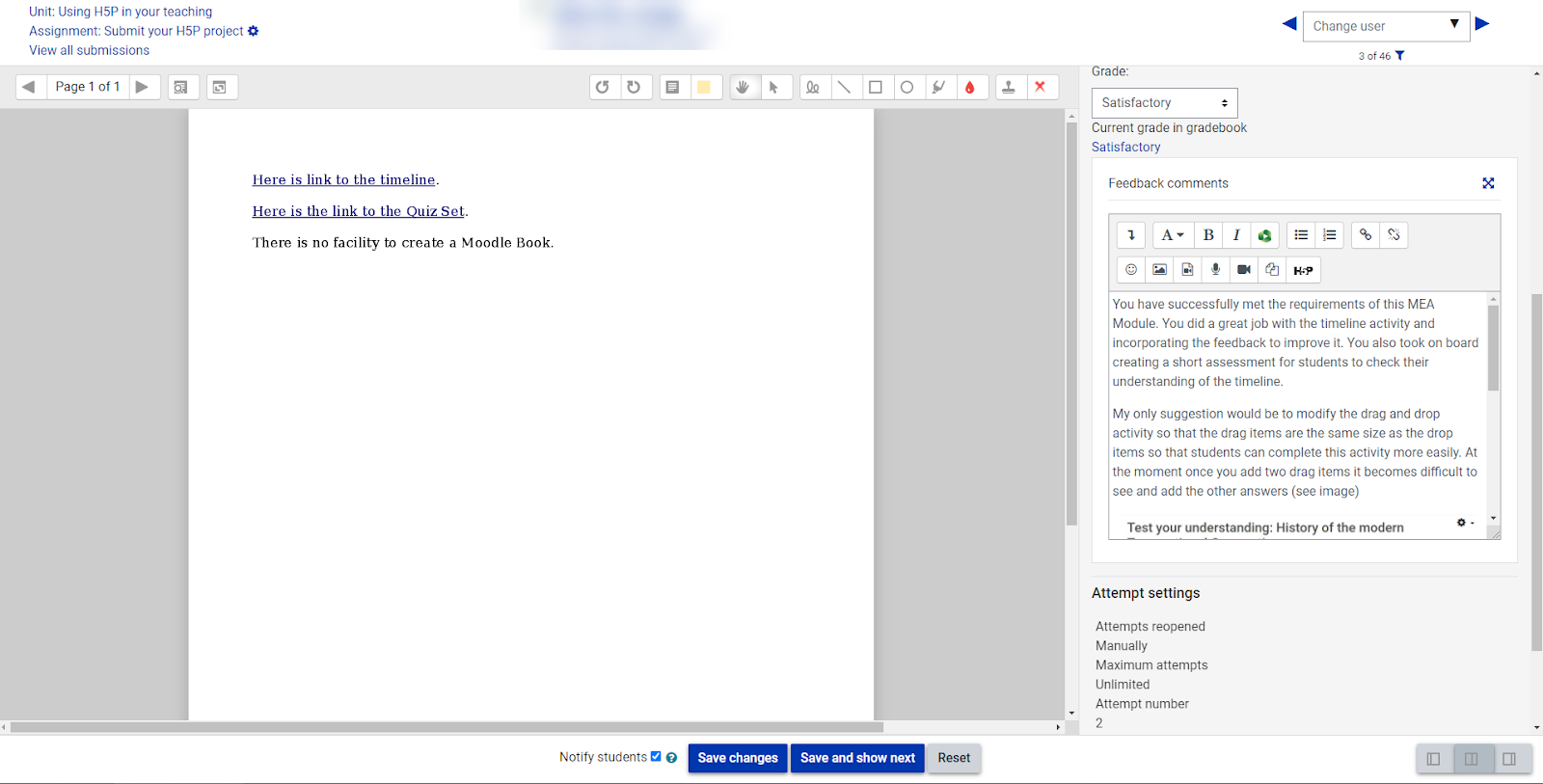
When you use the grade feature, you have the ability to add digital annotations to submitted PDFs where you can highlight and annotate the document to provide specific feedback using the annotation features seen on the top menu bar. Visit this guide for instructions on how to use this feature.
You can also provide written feedback for the overall assignment in the Feedback comments section. This section also allows you to create a video or audio feedback directly in the tool or attach a pre-recorded video via Panopto.
Marking guide
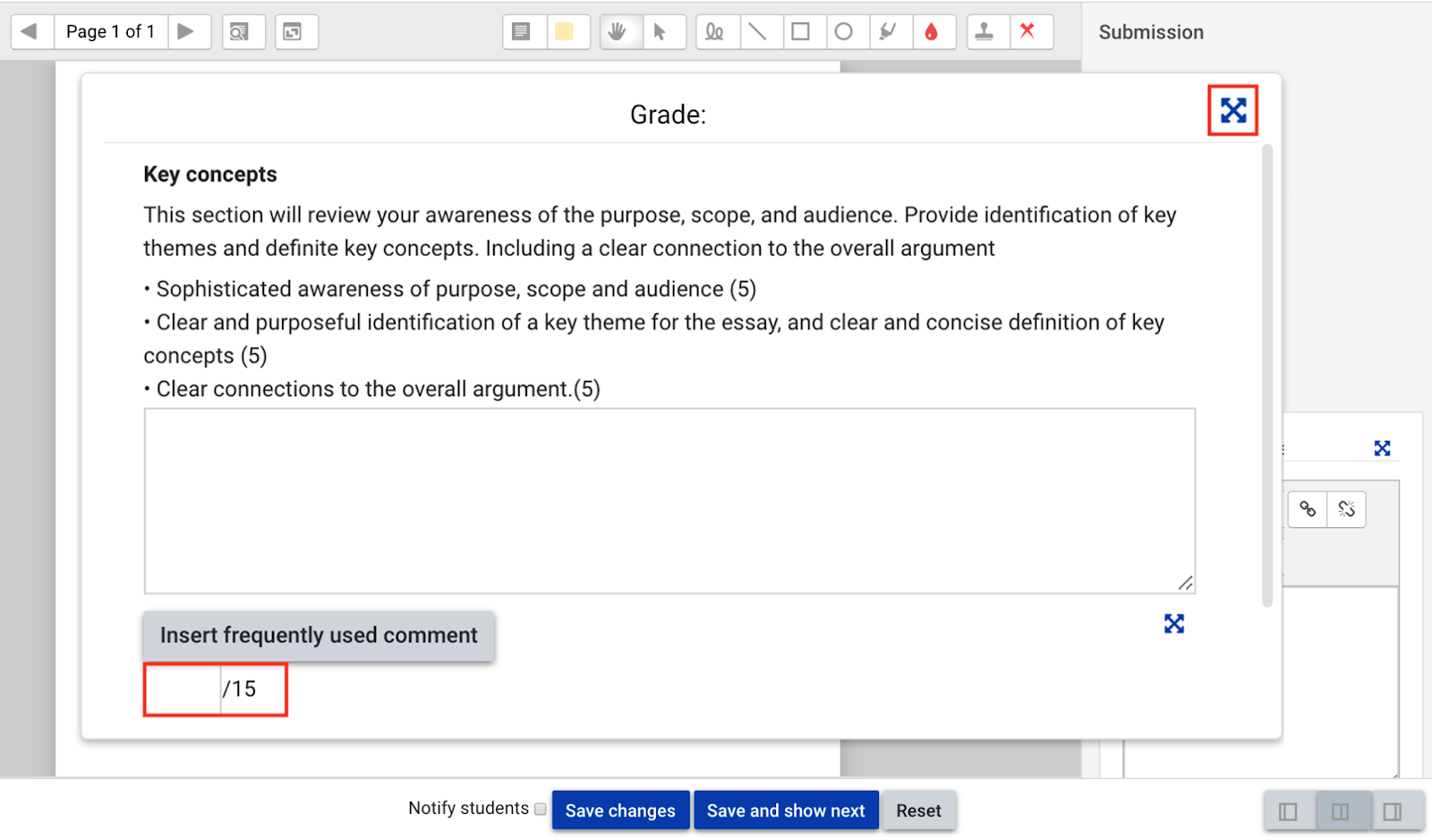
If you change the settings feature in a Moodle assignment into the Advanced grading with Marking guide, then you can unlock another set of features that allows you to make the task easier to interpret and less ambiguous and ensure greater consistency between different markers. Here you can provide descriptions for students and for markers and add criterion. You can also set up frequently used comments to make your feedback on certain criteria more consistent across markers. For more information on how to set this up, visit this guide.
Rubrics
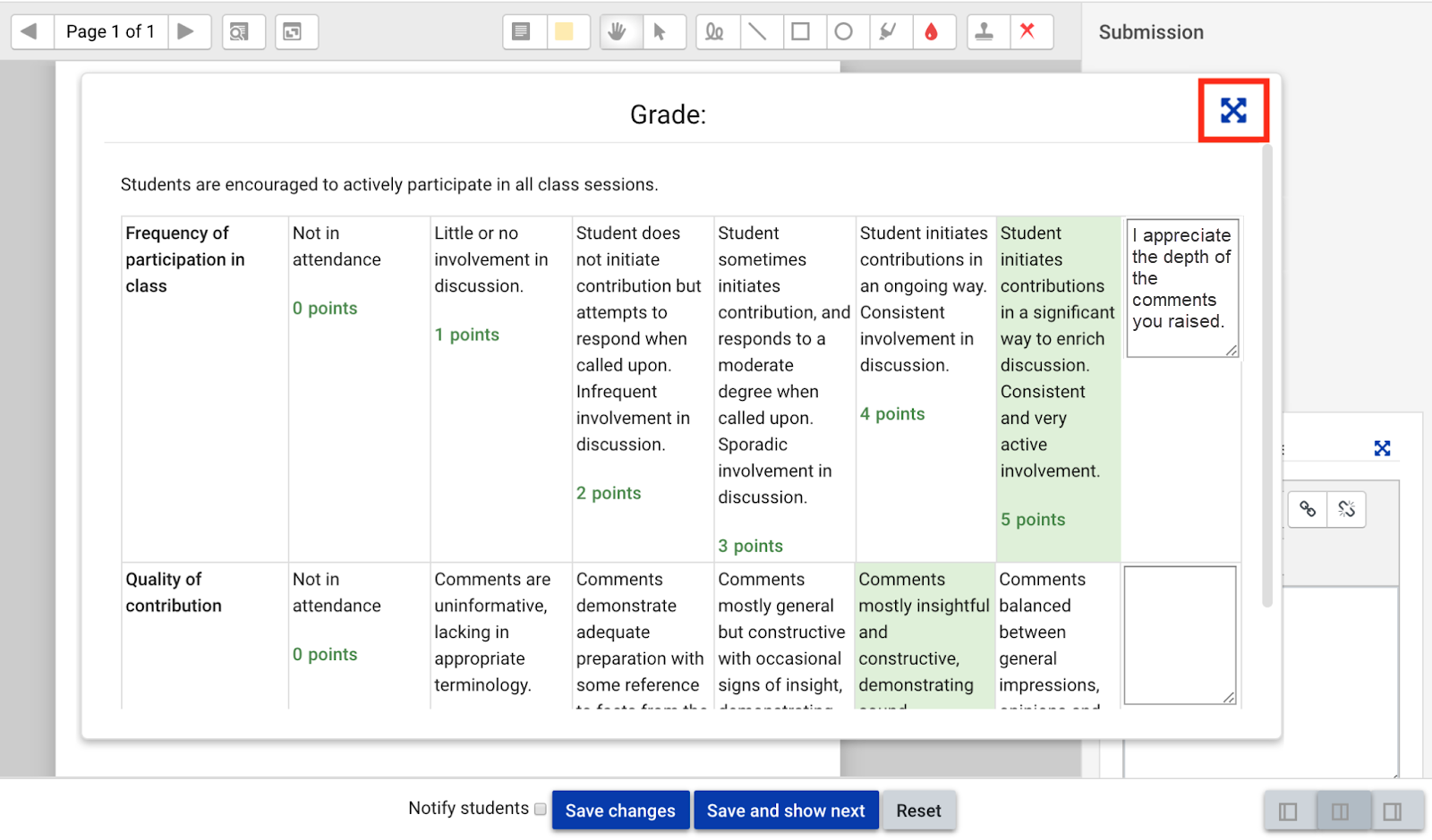
If you change the settings feature in a Moodle assignment into the Advanced grading with Rubrics then you can unlock another set of features that allows both students and markers to have transparency over the assignment criteria. Making the rubric available to students is a helpful way of having feedback available for their self-analysis and reflection prior to submitting an assignment.
-
Moodle forums can be used as a learning activity or as an assessment task which integrates feedback into the process of learning. Students can participate in a discussion or debate on a topic, answer a set of questions or discuss an artefact created by another student.
Feedback can be incorporated in two ways:
- Peer feedback
Moodle forums are a great tool to use when you want students to share their work and have other students provide some form of feedback or comments on how to improve it. You can also make the peer feedback part of the requirements in the settings by stating that a student needs to reply to another student's post.
- Educator feedback
Similar to peer feedback, the educator can also provide written feedback to students by replying to their posts, either privately or by making it visible to the whole class/group.
-
Google documents and slides can be used to provide feedback on students’ draft assignments to help them improve their learning. You could either use the commenting feature built into Google Drive or can use the suggestions feature to provide direct in-text corrections.
Audio and video feedback
Here are a few different technologies you could use to provide audio and video feedback.
-
There are a number of tools that you could use to allow you to record your audio feedback. It will all depend on what you have available and your comfort level with using the tools.
Recording an audio file:
You could provide overall feedback by recording a comment as an mp3 file using. These can then be uploaded into Moodle to share with your students, via a Moodle assignment or forum post.
- Voice Recorder in Microsoft Windows (free)
- GarageBand in Apple (free)
- Audacity (open source and free download)
- Panopto (Monash technology)
- Mobile device recorder
-
Video feedback can be provided as an overall feedback video or as feedback using screen capture to discuss the assignment directly. There are a number of technologies that you could use to provide video feedback and it is best to select the one that meets your needs and technical capabilities to make the feedback process more relaxed. Here is an example of two supported technologies at Monash that you could use.
- Panopto allows you to record a video and your screen then upload this directly into Moodle as an assignment feedback.
- Zoom recording can be used to either record your webcam or can record your screen and webcam. This guide provides information on how to record a video in Zoom
- Microsoft PowerPoint (2016 version up) has a built in recorder that allows you to record audio, video, screen capture and annotations. This could be a great way of providing feedback directly on an assignment or as a general feedback. View these instructions on how to record your screen You can then upload these recorded videos in Panopto and share them with your students in a Moodle assignment.
Automated feedback
The following technologies provide a variety of ways that you can integrate automated feedback.
-
Moodle Quiz has the option to provide deferred feedback or immediate feedback. There are three ways you can integrate feedback into Moodle Quiz:
- Generalised feedback: can be written in on individual questions, this is displayed to all students who attempt that question. In this instance, you can provide feedback for each question based on it being correct or incorrect which would be tailored to the content in the question.
- Overall feedback: a setting in the Moodle quiz that allows you to create automatic overall feedback based on the students grade. For example, when a student has completed the quiz containing a set number of questions, you can provide them with feedback based on the grade or grade ranges. For instance under 50% they would obtain one set of feedback and 51% and above would get a different set of feedback.
- Specific feedback: is tied to specific answers within a question type. This is useful to provide targeted feedback for a specific answer to a question. For example, you may have a multiple choice question with four potential answers. You could create automatic feedback for each individual answer. This is even more detailed than the generalised feedback but may not be available for all question types.
View this page to learn more about grading and feedback in a Moodle Quiz.
-
H5P has an array of question types that can be used and depending on the question type you can have an array of automated feedback options. Similar to the Moodle Quiz, you could provide generalised feedback based on the question or you could provide more specific feedback based on the answers of each question. Explore the H5P guides to learn more about this interactive activity tool.
-
Moodle lesson has an array of question types that you can include in the activity. Some of these have the option for automated feedback and others like the essay question can be marked manually to provide individualised feedback.
Moodle lessons also have default feedback that is integrated into every question to state whether it is correct or incorrect. You can use this feature to provide additional feedback to support the learning by explaining why they got the answer right or wrong. However, it does not offer the ability to create individualised specific feedback for each answer type.
View this guide to learn more about using Moodle Lesson.
Education Performance Standards Framework
View
The Education Performance Standards identify the expectations of education practice at Monash - See the Education Performance Standards for more details.
Impact on student learning | Impact on educational knowledge | Impact on educational environment | |||||
Effective teaching and learning | Responsive program design | Student- centred orientation | Professional learning engagement | Pedagogical content knowledge | Education research performance | Education innovation | Education leadership |
✓ | ✓ | ✓ | ✓ | ||||
You could address these Practice Elements by providing evidence of how you:
- Provide meaningful, constructive and relevant feedback
- Provide feedback through diverse channels eg video, audio etc
- Ensure that the feedback is timely
- Enable a feedback loop process
- Develop students’ feedback literacy
- Give students the opportunity to apply feedback