Simulating Chaos with virtual OSCEs
About this example
Charlton Quitoriano and Callum Shepherd from the Department of Paramedicine implemented practical and digital simulations, including digital OSCEs (Objective Structured Clinical Examinations) to prepare third year undergraduate paramedic students with the skills, the knowledge and experience to effectively manage mass casualty incidents and assess risks without being exposed to them.
Faculty of Medicine, Nursing and Health Sciences
-
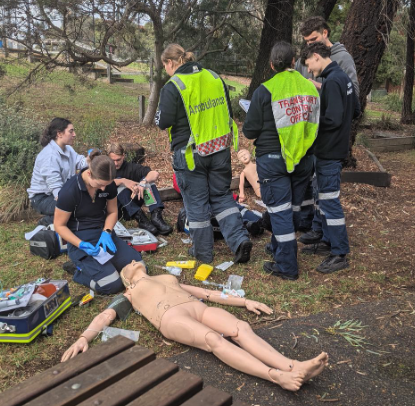
In 2024, I noticed that the unit and assessments regime had a lot of focus on theoretical concepts and frameworks when it comes to disaster management, but I really wanted to include more simulations, practical as well as digital simulation, so that the students have more opportunities to work on their skills in multiple casualty incident management. The previous exam was focussed more on policy, procedure, legislation which didn’t test any of the practical skills that the students learnt during the unit.
I collaborated with Ingrid D'Souza and Jim Hsu from the faculty education design team and we came up with an idea to have some more practical assessments and that looked at higher cognitive order thinking.
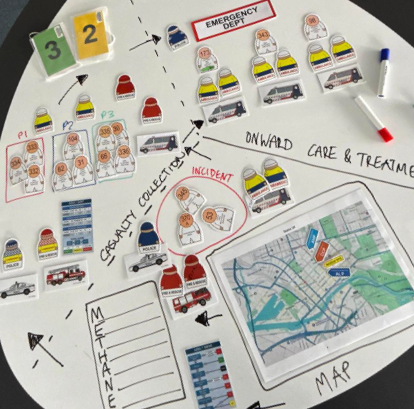
Before After Mid-semester online test Concept mapStudents had to pull things together and understand the workings of multiple casualty incident management.
Written essay Written essay + Video presentationStudents critically analysed a historical disaster and then delivered a short video presentation on how the disaster could be managed differently
Final written examination Digital OSCEStudents responded to a virtually simulated disaster and completed range of tasks from triage, risk assessment, forward planning and treatment
Difficulty of creating a practical simulation for this type of multiple casualty incident. So instead of doing something practical, we used digital technology to make a digital OSCE.
Some of the reasons why we decided to bring in the digital OSCE format:
- Reproducibility: A physical simulation of a mass casualty incident takes probably at least five mannequins or actors, and then you have the two students who are playing the trade off triage officer and the transport officer, so there could be variables of human error or facilitator error. A digital OSCE mitigates these issues.
- Cost effective: From a business perspective, it means that we don't have to have as many in-person, practical or skills that potentially could run over 3 or 4 days.
- Scalability: An effective and repeatable method of being able to assess a large volume of students, all at the same time.
- Equitable: Ensure that they are receiving an equitable method of assessment. The questions and structure were the same, other than the scenarios that change slightly, but the variable of human error or facilitator error in that was actually mitigated.
- Risk reduction: The site allows students to assess the risk in that environment without actually being exposed to it.
-
We used the online Moodle quiz platform as the structure surrounding the digital OSCE, with a range of tasks:
- A mix of dropdown select check the box type activities
- Different embedded activities
- Interpreting videos
- Looking at images
- Working through the information to formulate a plan of how they're going to manage that incident.
The key thing for us as we were designing this task was we wanted to make sure every question or every action that we wanted the students to undertake in this simulation was authentic.
It started from before the 000 call is made to when the 000 call comes down to them as that emergency ambulance crew and the initial paramedics attending. Then it moved right through the incident of arriving on scene, the initial treatment and assessment, and then ultimately getting those patients off to hospital. So it was that kind of that whole world view of what we would expect of our qualified and competent graduate paramedics.
We originally allocated 50 minutes to complete the task so that the students could have a time pressure associated with this task. As a paramedic, responding to multiple and mass casualty incidents needs to be very timely, so that initial time pressure I think put them under a lot of pressure and that was partially intentional in its design.
Watch a short video demonstration of the virtual OSCE (30 seconds)
-
The feedback from the students was that the tasks and the questions asked of them during the digital OSCE felt authentic to their practice as student paramedics and soon to be graduate paramedics as well. The students really liked the interactivity of being able to move around the virtual scene and then engage with the patients and the different tasks that were required.
For students it felt more immersive than just a written down exam of “Can you tell me the answers to X, Y, and Z?” They actually had to interpret the information and kind of navigate through the scene, which created some sense of realism as well.
And probably the other thing that the students really enjoyed was the overall flow of the task.
Some of the other student feedback was that the task was quite tight in terms of its time frame. We've found students often will finish their exams quite early. I think because this was not an exam, but because of the format of it being a digital task, I think that some of the students forgot potentially, that this was a digital OSCE that was under a realistic time pressure. There was a very, very small group of students that ended up not finishing the exam or just running out of time with maybe one question left.
-
Student feedback (Scaffolding)
"I loved how the tutorials actually prepared us for the types of questions that we encountered in the digital OSCE.”
-
Student feedback (Authenticity)
“The digital OSCE actually assessed what paramedics do in the real world.”
What's next
So in terms of improving the digital OSCE, I think the biggest thing would be to add some more multimedia to the actual Matterport space. So when you navigate through it, when you click on a patient, you get those patient vital signs.
It's very easy to embed video, so we can include a video of chest rise and fall. We can include sound for example, that could be the beat of someone's heart, and that would make the students actually have to assess those vital signs.
The other addition that I would like to include would be a soundscape for the digital OSCE. Part of being a paramedic and doing one of these scenes is knowing that there's so much chaos involved, and that's also sensory overload. So it would be great to also add that level of sensory input for the students so they know how to process information, whilst also trying to filter out that kind of excess sensory input.
-
Try it out
This exemplar is complex to implement.
Recommended resources and training:
- Work with your Faculty Ed design team to explore what is possible. The educational design team were absolutely incredible and a huge support in this.
- Reach out to people outside of your discipline to see what they’re doing as well.
- Use the Peninsula campus mock apartment, you are welcome to use our space! For access, contact holly.whittaker@monash.edu
-
The digital OSCE would be really appropriate in other kinds of healthcare disciplines where students need to interact with a person's home environment or potentially a hospital environment to interpret various sources of information.
Because you’re able to map out digitally any of the 360 environments for students to interact with. I can see this working very well where you have potentially hazardous environments, where the students may have to do a situational awareness or a hazard risk assessment.
Digital OSCEs could also be used in a hospital ward. You can do hospital ward rounds by digitally mapping this all out, and then you'll have those patient beds and then you, the students can walk through and get information from each bed in this hospital ward that's been digitally mapped out.
So it has a lot of applications whenever you need to have the students walking in or choosing to walk through or navigate through a digital space.If it's an environment that's particularly chaotic or hazardous, it allows them to assess the risk in that environment without actually being exposed, it keeps students safe.
At Peninsula campus, we have a mock apartment set up. We have a furnished bed, bath, kitchen and living room. So for our students, being able to practice in simulation in an actual patient's house provides that extra level of realism for the tasks that they might be required to carry out as a paramedic.
Any other departments can also use it, just get in contact with holly.whittaker@monash.edu (department administrator)! We've had people from occupational therapy, physiotherapy and podiatry come over to our apartment and use that for their simulations, whether it be a digital/recorded or in-person.
-
What we found was actually getting the 360s scan wasn't challenging and didn't take a lot of time. The biggest challenge with actually setting up the scan, the preparation and planning where everything needed to be at a given point, since when the initial scan started nothing else could move in that environment.
We used a mixture of storyboards and there was a bit of trial and error as well.
The scan only took about 30 minutes, and we managed to scan quite a large space with lots of people on the floor and lots of bits of information. The editing of the space— identifying an area, dragging a little pin onto it, and then labelling it with whatever piece of information that you needed on there was also actually quite straightforward and quite easy.
So to summarise, the key challenge was not in the scan, it was just in the preparation and just setting things up.
We had the essential areas that the students could investigate further that were as a part of the assessment. The students needed to get certain pieces of information, for example, in our assessment this would be patient observations, things like their heart rate, their blood pressure, their oxygen levels, etc.
We had to make sure that those were included for all of the patients, but the other things that we decided to include were just general tags and links to pieces of information such as a television, a light switch, a glass, a mat on the floor. This extra level of information so that the students would then be required to process information and work out what was essential, what they needed to keep, and also filter out the information that wasn't important.
Supporting resources
Here are some additional resources that you can browse to help you implement this assessment.