Workplace feedback with peer review
Try it out

This exemplar is easy to implement.
Recommended resources and training:
Supporting resources
Here are some additional resources that you can browse to help you implement this assessment.

Science Internship(SCI3920) is a third year elective capstone unit where students from a diverse range of science disciplines undertake an internship within an industry relevant to their field. One of the challenges of the unit is preparing our interns to transition from a student mindset, where they only receive feedback, to graduate professionals and science communicators who engage in peer review and communicate science in layman's terms, both skills essential in their future workplaces.
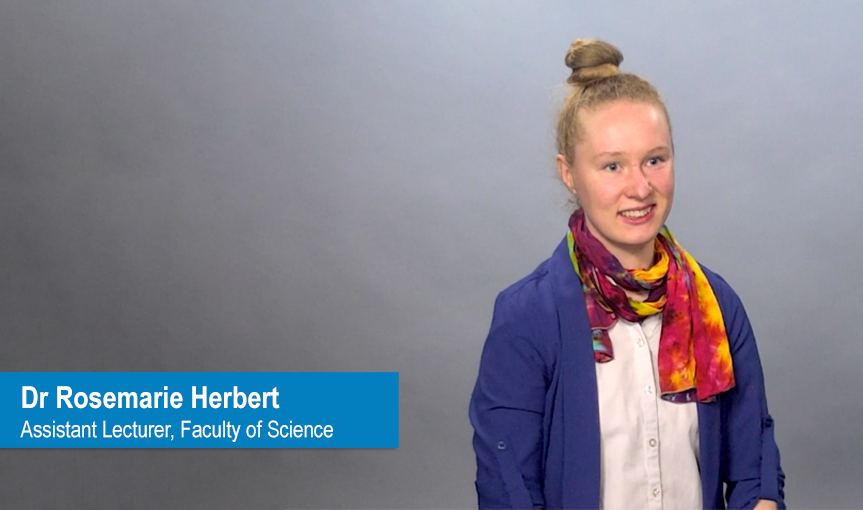
Watch the video to learn more about Rosemarie's Be inspired example
I've taught into a wide range of units, from microbiology and chemistry through to genetics. Almost every unit has had an oral presentation, and in most units students only receive feedback from teaching staff. Students really value feedback, and peer feedback gives them the opportunity to get more feedback. It also encourages them to actively engage with their peer’s presentations, rather than listening passively, and develop their critical thinking skills in order to evaluate their peers in a way that is deliberate.
As the final assessment in their Science Internship unit, our interns put together a five minute reflective video or presentation that covers:
Presentations are marked on three criteria sections: content, polish of the presentation and creativity.
Students give and receive feedback from three of their peers, which contributes 25% towards their final grade.
The goal of this assessment is to improve their communication skills and to flip their mindsets from passively receiving feedback to actively providing feedback as novice professionals. Once they go out into the workforce, peer feedback will be the primary form of feedback that they will receive.
The next iteration of this assessment will focus more heavily on science communication to a generalist audience. From my experience in the area of STEM student employability, science communication skills is one of the most important skills employers look for i.e. “Does someone who is not a scientist understand what you're communicating?”
Previously, I ran the peer review assessment using the Moodle workshop, which worked sufficiently for the task, but ended up being a very long and painful process because Moodle workshop does not accept late submissions. I ended up creating multiple versions (five!) of the assignment dropbox to accommodate late submissions.
In Semester 2, 2022, I ran the peer review assessment with the Feedback fruits Peer Review tool and adapted the activity to allow students to choose (using group self-selection) whether they wanted to submit a recorded video of their presentation or present live in a later scheduled face-to-face class. I also set up a duplicate Moodle assignment dropbox as a fail safe, to be able to run both activities in parallel if needed.
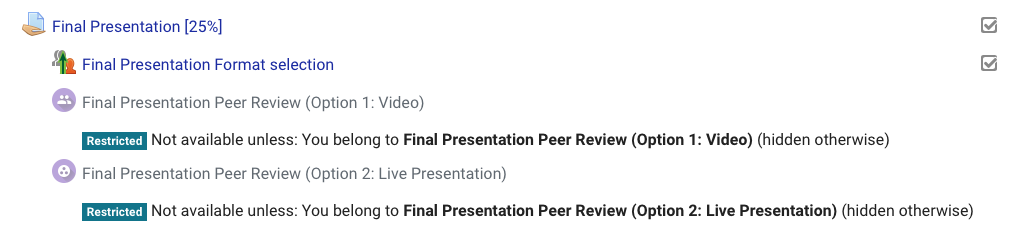
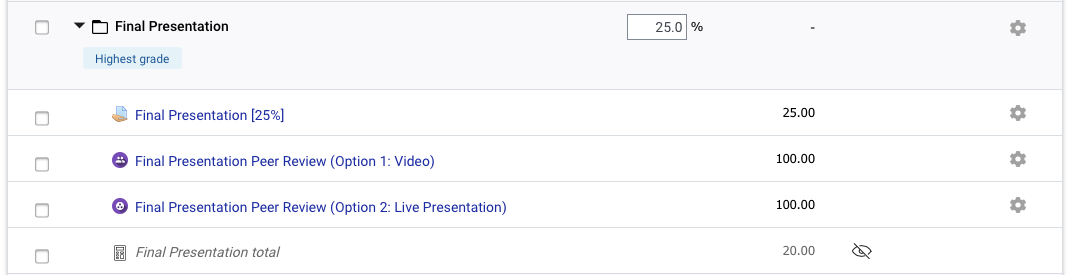
In the Gradebook setup, I created a category folder for the final presentation and set the aggregation to highest grade (setting the folder up to exclude empty grades would also work) so that whichever activity the students ended up completing, that would be the grade that was counted for their final presentation.
To prepare students for the Peer review, I also created a H5P interactive module to introduce the principles of constructive feedback, which you can view below.
I set FeedbackFruits up so that late submissions were accepted. Then, I gambled that there would be enough late submissions that even students who had submitted late would get a chance to review their peer’s work. It worked almost perfectly! I only had to follow up with two students via email who had missed the Peer feedback activity deadline. Those students instead attended and provided feedback at the live presentations.
It was important to me that students could organise themselves into groups for the live presentation so that students could take responsibility for their own learning. All the students that attended the face-to-face presentations were split into groups of five. Students were able to easily search for the name of the other students in their group within FeedbackFruits activity, and select students within their group to review.
FeedbackFruits worked remarkably well and ultimately created a better experience for everyone involved in the unit!
Overall it was a very successful experience that significantly decreased my workload. I went from using the Moodle workshop with five different drop boxes and a back-up google form - which worked well enough but is a pain to import back into Moodle - to having student marks and feedback automatically integrated with Moodle Gradebook.
The informal feedback from students was that they loved it. This assessment is the culmination of their 120 hour internship experience and most are graduating at the end of the year. The implementation of Feedback Fruits gave them the opportunity to hear about other people's experiences and learn about different presentation styles.
The scalability of FeedbackFruits is also really important to me, because although I only had 52 students this semester, I'll be running this unit again in Summer Semester A and B, and I will theoretically have up to 100 students. The ability to search within FeedbackFruits to find the person's name was also priceless!
This exemplar is easy to implement.
Recommended resources and training:
Students were able to engage in peer review in a meaningful way that was professionally relevant to them. All science students have previously participated in peer review using FBF in the core units SCI1000 and SCI1005 and FeedbackFruits is very user friendly from the student perspective.
Students always complain that they don’t get enough feedback. Using FeedbackFruits for peer review gave students the opportunity to get more feedback, without the daunting process of trying to organise additional staff in sufficient numbers to provide feedback.
I asked the students to organise themselves into groups of five and provide feedback for three members of their group so that each student could receive at least three reviews. To my surprise and delight, I found all the students who were there on the day just marked everyone else’s presentations because they were having so much fun! Students were able to engage in peer review in a meaningful way that was professionally relevant to them.

| Have a backup I'm pretty confident using Moodle so I essentially trusted that the activity to go right the first time. However, if you are unsure when it comes to implementing new activities, you can always set up duplicate dropboxes in Moodle as a fail safe and run both activities in parallel. You can still have your academics mark the presentations - then compare the grades to see if peer marking was similarly distributed. |

| Have an experienced colleague help you with the setup It's really helpful to have someone who's already created one to walk you through the process. A colleague walked me through the process and then I just spent some time playing with it. |

| Consider how you want students to provide feedback to their peers For example, do you want students to have to grade everything? Do you want them to put a comment for every single criteria? I found the ability to require a comment for each criteria in the marking rubric very advantageous as it led to more insightful feedback than broad general comments like ‘great presentation’. |

| Share grading rubrics with students ahead of time Ensure that you provide students with the grading rubric on Moodle prior to the FeedbackFruits activity as students will not be able to view the rubric for the FeedbackFruits activity until the dropbox becomes available and students have submitted their work. |

| Leave yourself enough time to explore the nuances of the grading settings Make sure you give yourself time to explore the setup of the grading and weightings. I had set up the rubric with different point counts and then discovered it wasn't adding up correctly because each criteria in the rubric was equally weighted. I had to play around with the weighting settings a little bit in order to get the final grade right. |
Here are some additional resources that you can browse to help you implement this assessment.