Policy and practice guidance around acceptable and responsible use of AI technologies
Monash University supports the responsible and ethical use of generative AI.
To equip our graduates with the skills that they need to develop with emerging technologies, we have a duty to explore and educate students on the benefits in the judicious use of technologies such as ChatGPT while also ensuring they understand the risks and ethical considerations of such tools.
Implications for assessment will be addressed by clear definition of expectations as part of the assessment conditions within units. The Assessment Regime Procedure and Academic Integrity Policy and Student Academic Integrity Procedure requires the inclusion of the following actions:
ActionsThere are four things Chief Examiners need to do to prepare their units to align with the current Monash University position on generative AI:
|
1. Specify conditions for the use of generative AI in assessment
View
It is important that the conditions for the use of generative AI are presented consistently across all Moodle units. This will ensure that students know where to consistently find this information. It is also important to enable high-level reporting purposes.
The approach to be used this semester is to identify the statement at the unit level.
There are three possible unit level statements that can be used.
| Approach | Statement |
|---|---|
| 1. Generative AI tools can be used for all assessments in this unit. | Generative AI tools can be used for all assessments in this unit. In this unit, you can use generative artificial intelligence (AI) to assist you in any way. Any use of generative AI must be appropriately acknowledged (see Learn HQ). |
| 2. Generative AI tools cannot be used for any assessments in this unit. | Generative AI tools cannot be used for any assessments in this unit. In this unit, you must not use generative artificial intelligence (AI) to generate any materials or content in relation to your assessment. |
|
3. Generative AI tools may be used selectively for assessments in this unit. Choose option 3 if AI use conditions vary across assessments in your unit or if types or ways of AI use is restricted for one or more assessments. | Generative AI tools may be used selectively for assessments. Please see specific guidelines outlined for each assessment task. |
NoteIf option 3 (Generative AI tools may be used selectively for assessments) is used, you MUST also accompany your unit level statement with additional assessment task level statements for each assessment task. |
Watch the video below for guidance on adding unit level and assessment task level generative AI statements into your Moodle unit.
Expand the accordions below for text instructions on how and where to add AI statements
-
Where to add a unit level AI statement
If a unit level statement is needed then it must be clearly visible to all students. If not already in place elsewhere then we recommend placing the Unit level statement in either the Unit Information or the Getting Started sections.
Note: Educators are strongly encouraged to use assessment level statements.
How to add a unit level statement to Moodle
To assist academics in communicating assignment conditions related to use of generative AI consistently across all Moodle sites, we have created a set of template statements which can be added to your Moodle unit where required. Where applicable, the messages include a link for students to the LearnHQ guide about Acknowledging the use of generative artificial intelligence.
You can copy paste the text statements or insert a more visually striking statement using the new Templates4U button in the ATTO text editor.
Expand the accordion below to learn more
-
- In your Moodle unit, ensure you have editing turned on.
- Navigate to your Getting started or Unit information section.
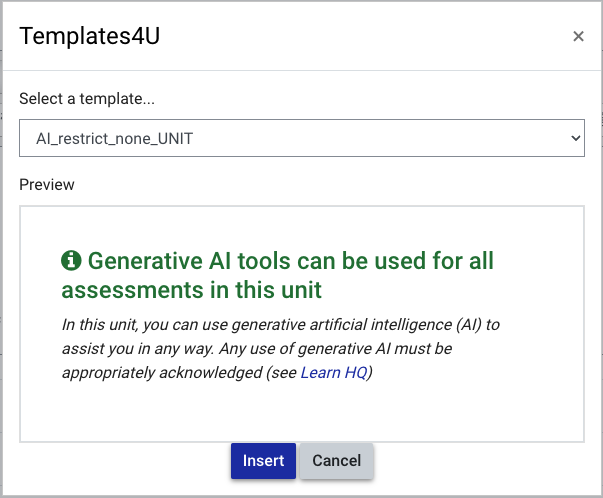
- To add the styled message, expand the full menu of ATTO icons by clicking the arrow in the top left corner, then click the Templates4U button.

- Select the appropriate message for your assessment from the template dropdown list.
- AI_restrict_none_UNIT displays the Generative AI tools can be used for all assessments in this unit notice
- AI_restrict_all_UNIT displays the Generative AI tools cannot be used for any assessments in this unit notice
- AI_restrict_varies_UNIT displays the Generative AI tools may be used selectively for assessments notice
- Once selected, you will be shown a preview of the text that will be inserted.

- Click Insert to add the message in your selected location. Do not change the Monash sanctioned text.
- Click Save and display.
-
- In your Moodle unit, ensure you have editing turned on.
- Navigate to your Getting started or Unit information section.
- According to acceptable use of generative AI in your unit, copy and paste the appropriate message below directly into the text field. Please be sure to include both the heading and body text. Please do not change the Monash sanctioned text.
- Once finished, click Save and display.
Generative AI tools can be used for all assessments in this unit
Generative AI tools can be used for all assessments in this unit.
In this unit, you can use generative artificial intelligence (AI) to assist you in any way. Any use of generative AI must be appropriately acknowledged (see Learn HQ ).Generative AI tools cannot be used for any assessments in this unit. Generative AI tools cannot be used for any assessments in this unit
In this unit, you must not use generative artificial intelligence (AI) to generate any materials or content in relation to your assessment.Generative AI tools may be used selectively for assessments in this unit.
Generative AI tools may be used selectively for assessments. Please see specific guidelines for each assessment task
Note
If you have selected an Option 3 unit level statement - that Generative AI tools may be used selectively for assessments - you need to take an additional step. You MUST also accompany your unit level statement with additional assessment task level statements for each assessment task.
-
2. How students acknowledge the use of generative AI
View
As AI becomes more integrated with our academic lives, you may have assessments that allow or require you to use it. In these cases, it is important to acknowledge the contribution of AI appropriately. AI differs from many other academic sources, as there is no specific author and it is usually not able to be reproduced or recovered. Further, AI can be used as more than just a source of information. You may use it to brainstorm ideas, or refine your writing. In cases like this, a citation would not be appropriate.
Whenever you are allowed or required to use AI in an assessment, you must also:
- Follow all instructions and restrictions on its use;
- Clearly document the type of AI used and how it contributed to the assessment;
- Provide written acknowledgment of the use of AI and its extent; and
- When necessary, cite and reference using the closest source types in the style being used (e.g., non-recoverable sources).
Acknowledging the use of AI
For each assessment, your Chief Examiner should explain how to acknowledge AI use. This will usually be a specific section of the assessment where you explain what tools you used, why you selected those particular tools, and describe how the tool was used and the output adapted. This will usually be in a written form, or may require screenshots or a video recording. Acknowledgement sections may also include reflection tasks where you reflect on how the use of AI contributed to your learning.
If you are unclear about how AI may be used in an assessment or how to acknowledge AI use as required in your assessment instructions, it is important to contact your Chief Examiner for clarification.
An example of what an acknowledgement section could look like:
Part B: Concise summary of AI use in the assessment.
Very briefly explain the ways that you have used AI in the production of this assessment.
- Explain which AI tools you have used and for what purposes. Describe what output from the tool/service has been included, and where.
- If you have found and used tools on your own, explain why these tools were selected and provide a URL link to the tool.
- Note the number of iterations undertaken with each main AI collaborative tool.
- Summarise how you have altered, adopted, or built on the AI output.
In addition to using this summary to provide an overview of how AI has been used, it is strongly recommended that you also carefully document the processes undertaken in creating the assessment and to be able to present this process evidence upon request from educators or administrators.
A suggested format:
I used [add AI tool (add link if needed)] to [add how used] and [add number of iterations/drafts]. I modified the outputs in [add ways].
I used AI in the following ways:
(i) generate ideas or structure suggestions, for assistance with understanding core concepts, or other substantial foundational and preparatory activity for the assessment.
I used Consensus (https://consensus.app/search/) and Scite (https://scite.ai/) to find relevant academic literature and ExplainPaper(https://www.explainpaper.com/dashboard) to help understand the arguments in the sources. I used GoodAI to create an outline (2 iterations)
(ii) generate text, rewrite, rephrase and/or paraphrase a portion of this assessment.
I used Microsoft Word with copilot assisting to prepare the essay drafts (4 iterations). I used GoodAI to help revise the introduction (3 iterations) and then ChatGPT3.5 (2 iterations) to make the introduction sound more academic. I further edited the introduction adding appropriate citations.
(iii) generate some other aspect of the submitted assessment.
I tried Microsoft Excel with copilot assisting to make the graphs but found GraphMaker (https://www.graphmaker.ai/) to produce better results for creating the graphs used as evidence in the essay. I used ChatGPT3.5 to change the bibliographic references into notes form for use in the footnotes.
Legend: [1] AI system(s); [2] link to the tool; [3] how the tool was used or prompts included; [4] edits and changes made to the output.
- [3] Write a 50 word summary about the formation of Monash University. Write it in an academic style. Add references and quotations from Sir John Monash.
Legend: [1] AI system(s); [2] link to the tool; [3] how the tool was used or prompts included; [4] edits and changes made to the output.
If AI was permitted to be used in your assessment, but you have chosen not to use it, the following disclosure is recommended.
Documenting AI use
You should be able to provide evidence how you used AI in your writing process if requested. This may be required as part of your assessment instructions, but regardless, you are strongly encouraged to develop the habit of documenting your work as you may be required to provide this evidence if requested.
This can include taking screenshots of different stages of collaborative AI use, keeping copies of prompts and outputs used, and keeping copies of drafts used in the preparation of assignments, as well as notes on how prompts were integrated and adapted. One recommendation is to colour-code or annotate drafts to show sections where AI has been included or adapted alongside your own writing.
In-text citations and reference lists
In certain circumstances, in addition to a declaration, you may also be required to cite and reference material generated by AI as you would any other source in your assessment. Check your assessment details to see whether an additional citation and reference of the generated material is necessary.
The majority of citing and referencing styles supported at Monash have published guidelines on how to cite and reference artificial intelligence technology sources. Use the Library style guides for the most up to date instructions from the style manuals. As AI tools and the rules around using them are evolving quickly, always check with your lecturer for guidance on how to cite AI in your work.
Remember to check if non-recoverable sources need to be included in the reference list.
The following are examples from the MLA and APA styles:
Prompt: Was Sir John Monash a good man?
“Sir John Monash is widely regarded as one of Australia's greatest military leaders and is also considered a respected engineer and administrator. His contributions to the military and to society as a whole have been praised by many, so it can be said that he was a good man. However, as with any historical figure, opinions may vary…..” (OpenAI, 2023)
Reference
OpenAI. (2023). ChatGPT (Jan 9 version) [Large language model] http://chat.openai.com/chat
Prompt: Was Sir John Monash a good man?
“Sir John Monash is widely regarded as one of Australia's greatest military leaders and is also considered a respected engineer and administrator. His contributions to the military and to society as a whole have been praised by many, so it can be said that he was a good man. However, as with any historical figure, opinions may vary…..” (“Was Sir John”)
Reference
“Was Sir John Monash a good man?” prompt. ChatGPT, 9 Jan. version, OpenAI, 24 Jan. 2023, chat.openai.com/chat
Note
|
3. Guidance for students
View
Students can access information on how to acknowledge generative AI on Learn HQ.
LearnHQ: Acknowledging the use of generative artificial intelligence
Additional resources on Learn HQ can be used to refer students to or to inform discussions in class. They:
- provide advice on the use of generative artificial intelligence
- discuss the reliability of generative artificial intelligence
- share guidelines on using generative AI in assessments
LearnHQ: Using artificial intelligence
The work of educators to teach students about responsible use of generative AI and academic integrity is critical now more than ever before. With educators’ support, and open discussion on the issues around AI technologies, together with clear communication about the possibilities and limitations of these tools, we will be able to build students’ academic practices which align to the values of academic integrity. Research tells us that relationships between educators and students and the establishment of trust act as preventive mechanisms which reduce student motivations to take shortcuts and cheat.
Review these ideas and resources to support student education about academic integrity
4. Managing suspected breaches of academic integrity
View
The academic integrity statement that appears when students submit their assessment in Moodle will be updated to make reference to the acceptable use of generative AI.
When marking assessments, if unauthorised use of generative AI is suspected, it should be reported through the Academic Integrity portal. Chief Examiners will review reports and if they suspect inappropriate use of generative AI, they must refer the matter to Student Conduct and Complaints. A copy of the assessment, assessment instructions and any other relevant evidence should be provided to Student Conduct and Complaints, along with commentary from the reporting staff member and/or Chief Examiner as to why they suspect inappropriate use of generative AI. Student Conduct and Complaints will manage suspected cases in accordance with agreed protocols and communicate the outcome to the Chief Examiner.

This work is licensed under a Creative Commons Attribution-NonCommercial-ShareAlike 4.0 International License