
Activities
Allocation methods
The allocation method appears next to the activities.
Class activity types
There are nine different activity types in Allocate+.
Class delivery modes
Repeated activities
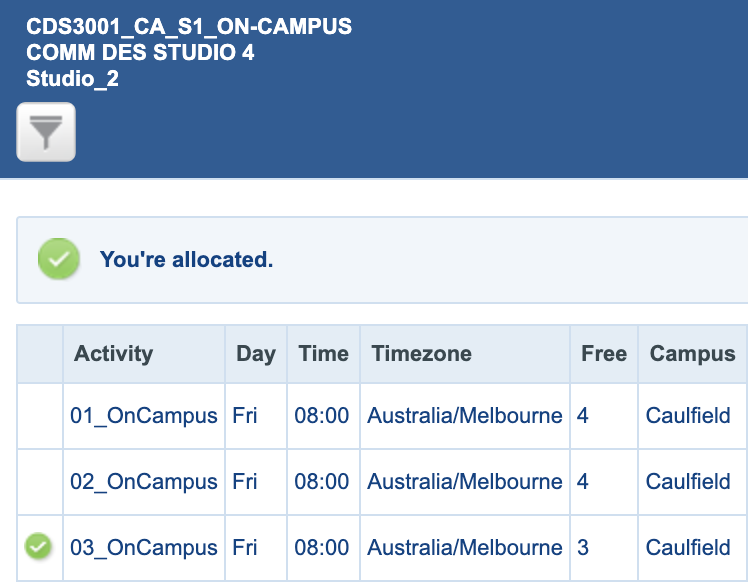
In this example, the same activity occurs three times in the same week.
You need to select one of the tutorials (e.g. Tutorial/03) and attend it for the entire semester – you cannot switch between activities once you’re allocated and your timetable is finalised.
Multiple part activities
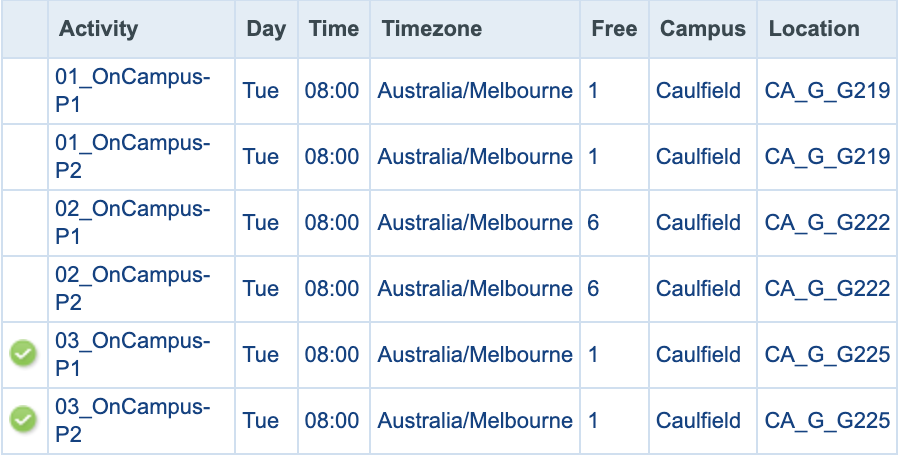
Sometimes, activities are divided into multiple parts, and you need to attend each part.
In this example, there are three activity options with two parts – Part 1 and Part 2. You can choose either 01, 02, or 03. Activity 03 has been selected and both P1 and P2 would need to be attended.
Got a question? Message Monash Connect
Try MoVA, Monash's virtual assistant
MoVA has answers to most common questions. If it can't find an answer, it can connect you with a real person using messaging or help you make an online enquiry.