
Entering your preferences
Use Allocate+ to nominate your preferred times for all your class activities, such as lectures, tutorials, laboratories and practicals. Your preferences are then sorted by the system to create a timetable that suits as many students as possible.
When to enter preferences
Preference entry is not based on first-come, first-served, so you have about two weeks to enter your preferred class times.
Check our Allocate+ dates page to see the timeframe to enter your preferences.
Enrolment changes
If you change your units in WES during the preference entry period, remember it takes two hours for it to show in Allocate+. Once the change appears:
- enter your preferences for the new unit activities
- check that your existing preferences are still valid
- ignore any withdrawn units (you don’t need to do anything with these).
How to enter your preferences
Below each unit is a list of activities (lecture, tutorial, etc). For some class activities, there’s only one session, so the system auto-allocates these sessions to your timetable. These are labelled READ ONLY, meaning you can’t make changes.
In the Activity column you’ll see the class delivery mode – for explanations of each delivery mode, check out the Allocate+ glossary.
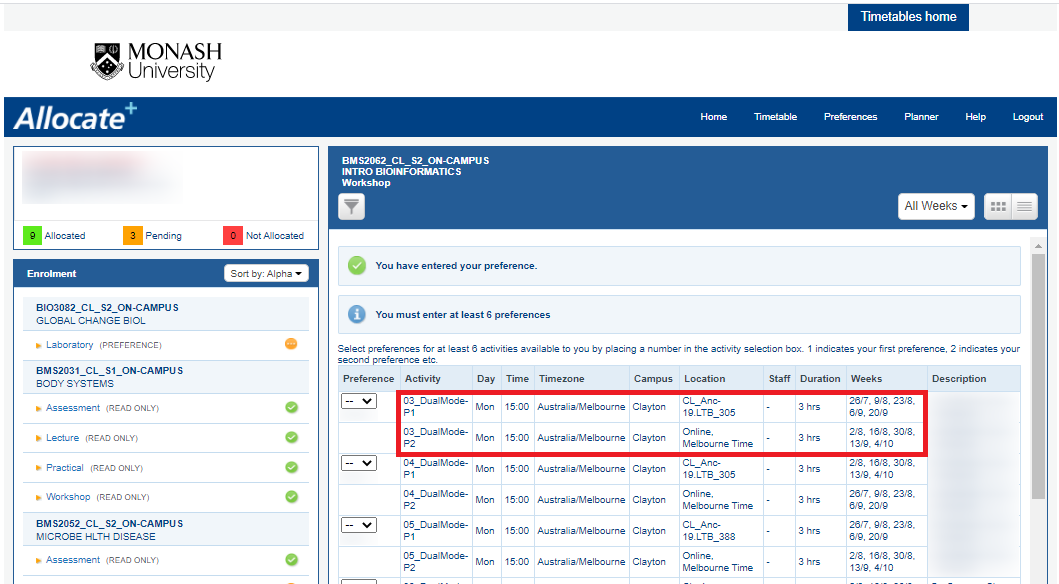
 Classes with parts – Part 1 (P1) and Part 2 (P2)
View
Classes with parts – Part 1 (P1) and Part 2 (P2)
View

Got a question? Message Monash Connect
Try MoVA, Monash's virtual assistant
MoVA has answers to most common questions. If it can't find an answer, it can connect you with a real person using messaging or help you make an online enquiry.