
Display non-weighted activities in the assessment table
At a glance
Identify which supplementary and non-weighted activities can appear in the Assessment structure summary table, and the settings needed to display them. Check the required Monash Assessment activity settings, review display conditions by activity and external tool type, and see which items are never shown in the table.
Supplementary and non-weighted activities that support assessment can also be displayed in the Assessment summary table.
For most activities, selecting Yes for Does this activity contribute to the final grade of the unit? in the in Monash Assessment activity setting will allow it to appear in the Assessment structure summary table, even if an item is not graded.
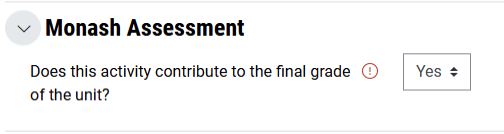
For other activities, in addition to selecting this option, you may need to select a Grade type or Rating in order for the activity to appear in the Assessment structure summary table.
Check the table below for the specific display conditions for each activity type
| Activity type | Grade type: Point/Scale | Grade type: None | Ratings: None | Ratings applied |
|---|---|---|---|---|
| Assignment | ✓ | ✓ | ||
| Attendance | ✓ | ✓ | ||
| Database | ✓ | |||
| Forum | ✓ | ✓ | ||
| Glossary | ✓ | |||
| H5P | ✓ | |||
| Lesson | ✓ | |||
| Open forum | ✓ (Rating must also be selected for Grade type) | |||
| IMS Content package | Will not appear in the table | |||
| Interactive content (H5P) | ✓ | |||
| Quiz | ✓ | |||
| SCORM Package | ✓ | |||
| Wiki | Will not appear in the table | |||
| Workshop | ✓ | |||
| eAssessment Grade Sync | ✓ | |||
External tools that accept grades
| External tool type | Grade type: Point/Scale | Grade type: None | Rating: None | Rating applied |
|---|---|---|---|---|
| Cengage | ✓ | ✓ | ||
| Ed Discussion (FIT) | ✓ | ✓ | ||
| FeedbackFruits 1.3 | ✓ | ✓ | ||
| Labster AU | ✓ | ✓ | ||
| Macmillan Content tools | ✓ | ✓ | ||
| Macmillan LTI tools | ✓ | ✓ | ||
| PebblePad LTI 1.3 | ✓ | ✓ | ||
| Perusall LTI 1.3 | ✓ | ✓ | ||
| SimCapture | ✓ | ✓ | ||
| Voicethread (MADA) | ✓ | ✓ | ||
| Wiley Assignments | ✓ | ✓ | ||
| Wiley Resources | ✓ | ✓ |
Items not shown in the table
|
|
|
|---|