
Enable anonymous submissions
At a glance
Enable anonymous submissions in Moodle Assignment to display student work to markers as a participant number rather than by name, helping reduce unconscious bias in grading. Understand when to set this up, how it works if students include their name in a submission, and how to reveal student identities once grading is complete.
Jump to these sections:
Anonymous submissions enable student assignments to be displayed anonymously as a Participant number rather than by their name. This is a useful way to reduce unconscious bias in grading. Anonymous submissions must be set up prior to any student submissions being made. Once a submission has been received, you can no longer enable anonymous submissions in the assignment settings.
Note: If a student has included their name in their assignment submission, it will still be visible.

Enable anonymous submissions
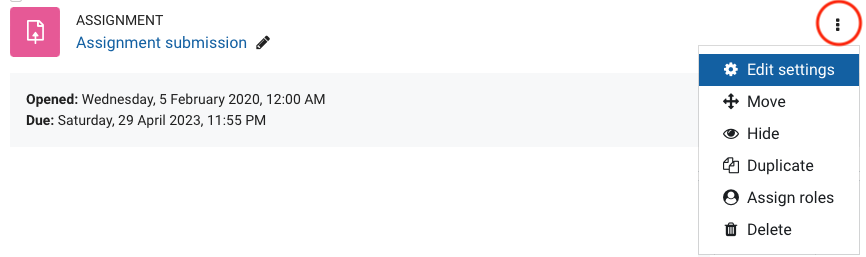
- For the Assignment that you want to enable blind marking for, click on the three dots the Edit cog, then select Edit settings.
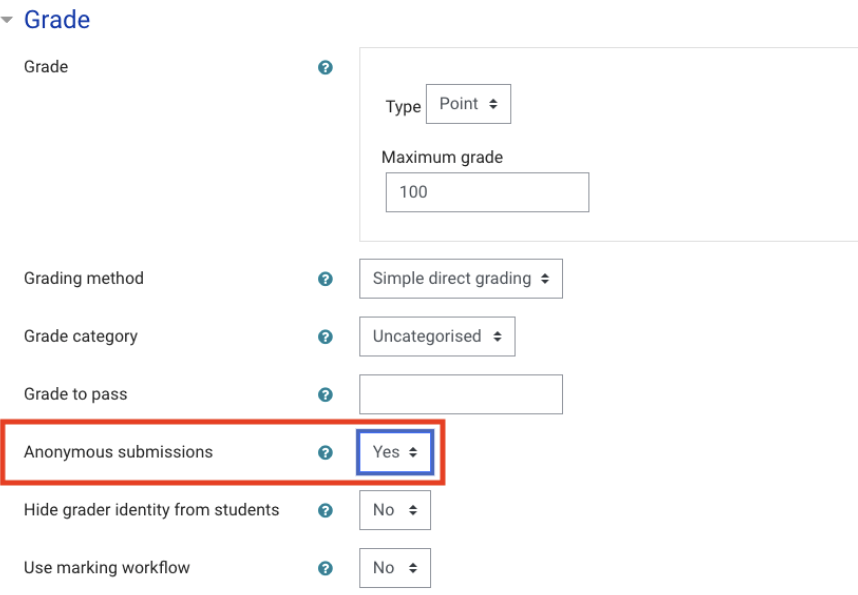
- In the Grade section, select Yes for Anonymous submissions.
- Click Save and Display.
Reveal student identities
- At any stage you can optionally choose to Reveal student identities.
- Navigate to your assignment where you have enabled Blind marking.
- From the top menu banner, select Reveal student identities.
- Click Continue to confirm that you would like to reveal student identities.
Note: Once student identities have been revealed they cannot be hidden again.
