
Use automated late penalties
At a glance
Apply automated late penalties to Moodle Assignments in line with Monash policy, and understand the conditions required for penalties to calculate correctly. Explore how exemptions, recalculations and the supplementary assessment waiver work, and learn how to manually recalculate penalties when needed.
Where the automated late penalty setting has been enabled for Moodle Assignments, late penalties can be automatically calculated and applied in line with Monash policy (Marking and feedback procedure). Once a penalty has been applied to a grade, it will be marked for both teachers and students with a small red alert icon. Mousing over this icon will reveal the applied penalty.
Automated late penalties can be applied when the following conditions are met:
- Activity type: Moodle Assignment
- Grade penalties is set to “Yes”
- Moodle Gradebook: Grading schema is set to “Standard”
Note: For assessments that do not meet these conditions, late penalties must be applied manually using mark overrides.
Once a penalty has been applied to a grade, it will be marked for both teachers and students with a small red alert icon. Mousing over this icon will reveal the applied penalty. For more information, see How-to: Create a Moodle assignment activity.

Moodle assignments without submissionsWhere a Moodle assignment activity has a due date but does not require students to submit to the activity (for example a Presentation), the Grade penalty should be set to No and the automated late penalty should not be used. This is because if a student has not submitted and has received a mark for an assignment, the penalty will proceed based on when the academic first marked the student and all students will be registered as submitting late. |
Exemptions and recalculations
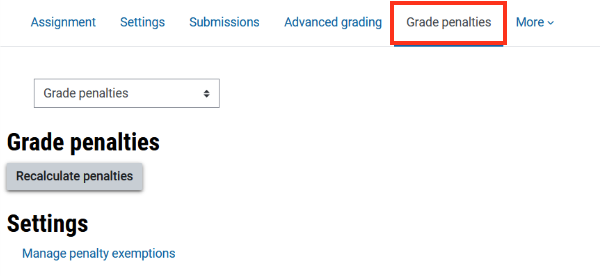
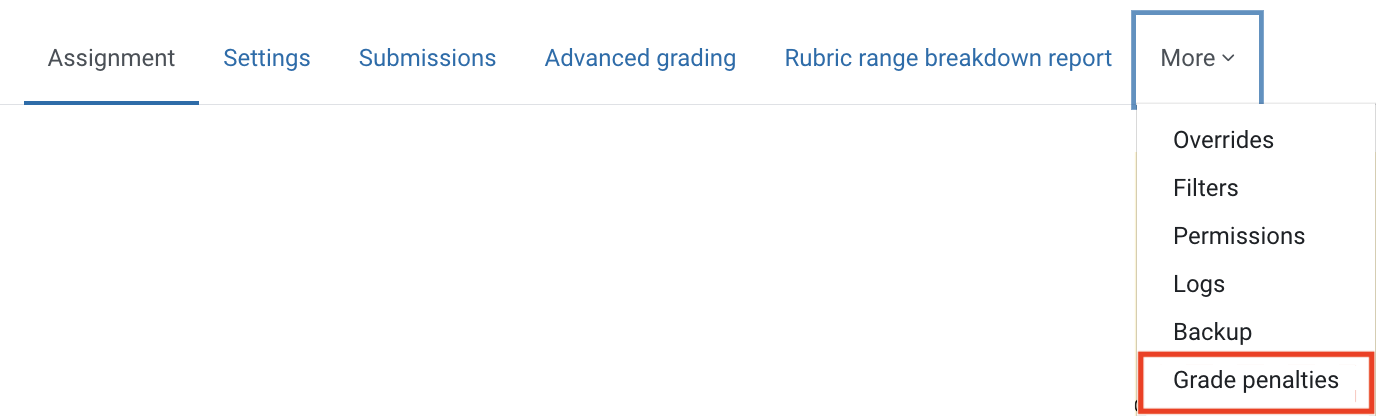
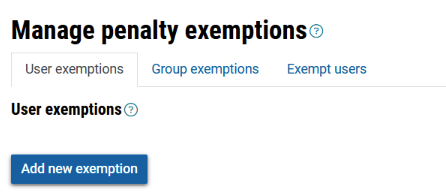
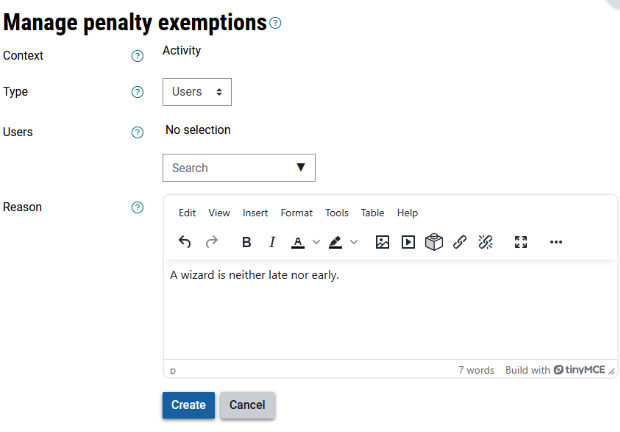
Any adjusted due dates that are applied to groups or individuals before the due date (eg. a blanket extension, group based due dates) will be respected in the lateness calculations as expected. There are also settings available to exempt students from penalties or to recalculate penalties if date changes occur after the due date (such as special provisions).
Marking workflow
If a marking workflow is in use for an assessment, the late penalty is not applied until the grades are released to the students.
NoteAny special provisions (including special consideration extensions) that are granted after the assignment is marked will require recalculation. This is automated by the Recalculation penalties setting (by default this is set to Yes in the Assignment settings). If you have a reason to not apply automatic recalculations, this setting can be changed to No and you can instead manually recalculate penalties. |
Expand the accordions to learn more

Supplementary assessment waiver
NoteThe automated late penalty waiver will not be triggered when:
Additionally, when manual late penalties have been applied in the unit, eg. forum activities, quiz activities, the automated late penalty waiver will be triggered, but may not be accurate, please review and manually apply waiver where late penalty has been applied through other methods. |
Where the students' overall mark is between 45 and 49, the Marking and Feedback Procedure (section 1.14) includes a special provision for students and units that are eligible for supplementary assessment. Where the students' overall mark is between 45 and 49 due to an automated late penalty, the supplementary assessment will automatically be waived and the students’ mark will be adjusted to 50P.
For example, where the students overall mark is:
The Late Penalty Exemption process is triggered automatically on the Manage Results page when the Validate Results button is clicked and when the following conditions are met:
- The student’s final unit mark on Manage Results page (including overrides) is between 45 and 49 (inclusive) and one or more assignments has late penalty applied,
- Student does NOT have any of the following comment in Manage Results comment and:
- Not eligible for NS due to academic misconduct
- Not eligible for NS due to Academic Board approved exemption
- Not eligible for NS due to failed competency hurdle
- The assessments were not submitted more than seven days after the due date.