
Display LaTex notation
At a glance
Display and troubleshoot LaTex notation in Moodle text areas, including how to compile equations on their own line or in-line with text, and how to adjust filter settings if notation fails to compile correctly.
Jump to these sections:
Troubleshoot LaTex notation display
If LaTex notation fails to compile, you can troubleshoot LaTex notation display in Moodle using filters.
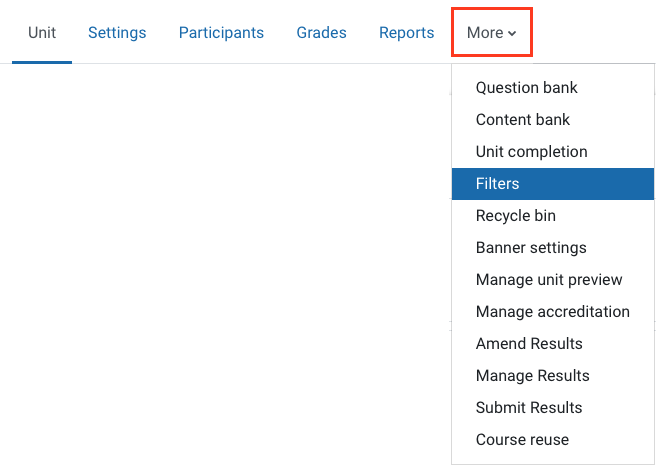
- In the top menu, click More and then select Filters.
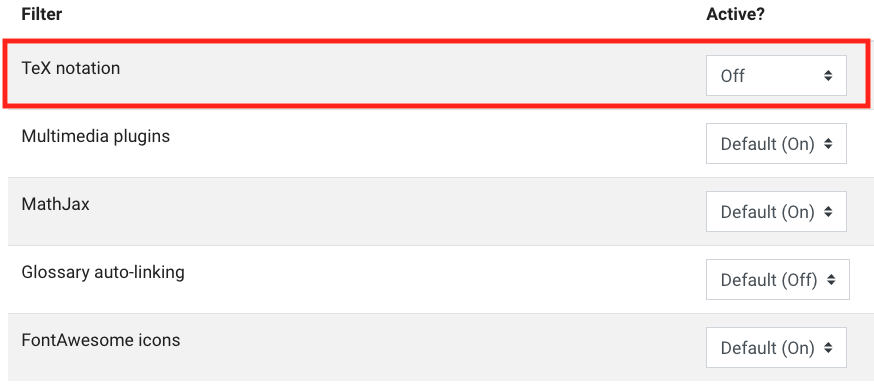
- Switch the setting to Off from the dropdown list for TeX notation only. Do not change any other filter settings.
Display LaTex notation on its own line
To compile LaTeX notation in Moodle, enclose equations with a pair of backward slash and square brackets, \[ and \]. You can insert additional spaces in the equation using a single backward slash \.
Example LaTex notation and its compiled form
\[ x\ =\ \frac{\sqrt{144}}{2}\ \times\ (y\ +\ 12) \]

Display notation in-line with text
To display LaTex notation in-line with text, enclose equations with a backward slash and round bracket pair, \( and \).
Example LaTex notation compiled to display in-line with text
The point \( \left( {{x}_{0}}+\frac{1}{p\left( {{x}_{0}} \right)}\ ,\ \frac{q\left( {{x}_{0}} \right)}{p\left( {{x}_{0}} \right)} \right) \) is located...
