
Collaborative learning
Collaborative learning
Collaborative learning is an important component of learning. This occurs when students work in groups and learn from and with each other. Discover how collaborative learning can take place in real time either in person or online, or even asynchronously.

Why use collaborative learning processes?
By sharing individual experience and expertise, students create an authentic learning environment which replicates collaboration in professional or community settings.
As assessment, collaboration can be used for capstone projects, work-integrated learning, authentic assessment, laboratory work or creative projects that are designed to encourage students to demonstrate their knowledge, skills and capabilities.
-
Facilitate collaborative learning processes
Explore common processes for collaborative learning, including how to plan collaborative tasks, create and manage collaborative teams, guide students and assess collaborative work.
-
Related technolgies
Learning about educational technologies that can be used to support collaborative learning.
Collaborative learning activities
View

There are many types of learning activities that can be done by students collaboratively. How these are structured will depend on whether the activity is an in-class activity (and whether this, or part of it, is assessed or not), or a formal assessment task. Regardless, educators need to consider whether these activities will happen online or in person, or synchronously/asynchronously, and how they will be managed in all cases. Some ideas for in-class and assessment collaborative learning activities are below.
Group work
Group work can be used in a variety of classroom situations. For example, students can be organised into teams to work on a solution to a set of problems, create arguments for a debate, or discuss case studies. These collaborative activities are also possible online, using Moodle forums, the Google suite, MS Teams or Zoom, and other technologies.
Group assessment
Collaborative assessment activities require educators to think through not only the activity, but how it will be assessed, and what components require individual assessment, and which parts will be collaboratively assessed. The resource Group and Peer Assessment outlines some of the strategies you can use for creating collaborative group assessments.
Collaborative learning examples
View
-
This example looks at how the unit BEX3500: Current Issues in Commerce incorporated a collaborative case study activity. The goal of the collaborative activity was for each group to analyse one of seven authentic cases from a set of key companies and to produce a collaborative stakeholder matrix.
Teaching Strategy
The educator provided short descriptions of the case studies (one to each project team) to initiate group discussions. Students had to actively participate in the discussion to analyse their case study, which was scaffolded using a guide with a set of four questions to address.The answers to these questions helped frame the second part of the activity, which was to fill out the stakeholder framework worksheet (Image 1). Providing students with this sheet helped them with analysing the assigned case study and ensured all teams were being assessed on the same criteria. There were two main tools used in this online workshop activity: Moodle discussion forum (Image 2) and a Google document.
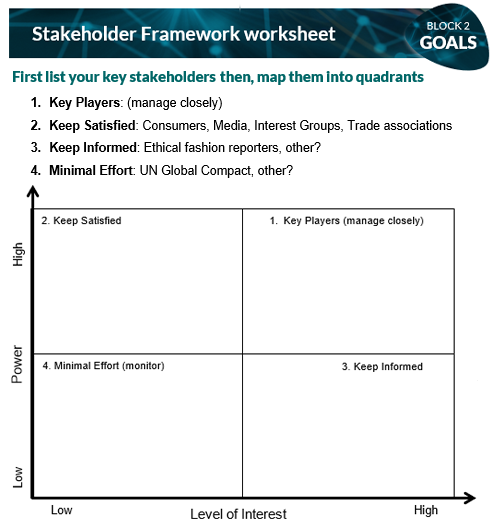
Image 1: Problem-based case study worksheet
Discussion: A number of discussion forums were created in advance based on the case studies distribution and pre-set student groups (project teams).
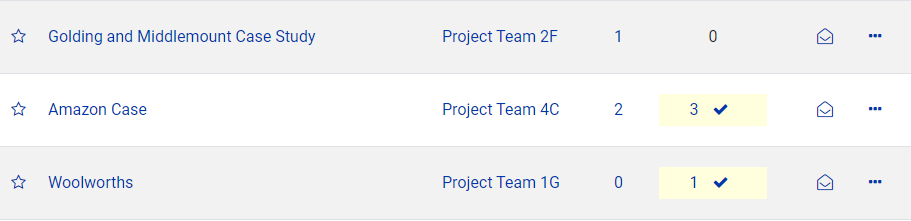
Image 2: Moodle discussion forum
Group-based analysis: Students used Google docs to complete a Stakeholder Framework matrix and attached it to their forum threads or shared the links.
Recommendations
- Write up case studies that can be divided among the groups, making them authentic and relevant will encourage students
- Provide students with a guide to scaffold the group discussion with key questions
- Create a handout or online shared document on Google Drive that students can use to frame the conversation and analysis
- Create a Moodle Forum for each group of students to discuss their ideas in a synchronous manner.
Credits:
- Dr Jacqueline O'Toole, Lecturer, Faculty of Business & Economics
- Mr Kimble Montagu, Teaching Associate, Department of Marketing
- Rod Sarah, Industry Fellow, Teaching Associate, Faculty of Business & Economics
-
This example from FIT5057: Project Management is an online tutorial collaborative activity that helped prepare students for their group assignment project plan report. The activity provided students with a high level of understanding of the planning processes in project management, as well as sound skills in the use of project planning tools.
Teaching Strategy
The educator created a platform for synchronous and asynchronous communication and collaboration for each project team. This tool provided opportunities for students to discuss project requirements, share links and documents, create and co-edit the assignment report.
Microsoft Teams was used as the primary student communication and collaboration tool. A separate team was created for each tutorial. Students were assigned to large groups (group 3 in the images below) and sub-groups (project teams 111 and 112 in the images below). Each project team had its own channel with no access to other team channels. The channel tool provided students and educators with one central hub for all the communication relating to the project.
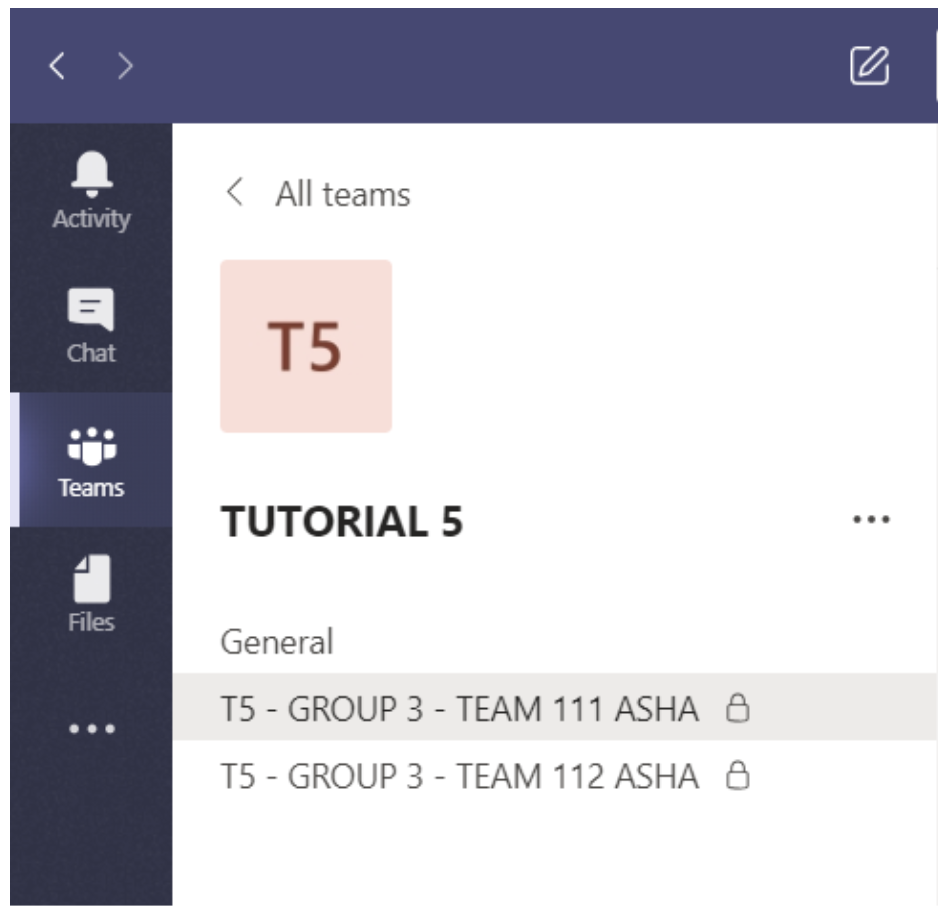
Image 3: Microsoft Teams Channel Set Up
The channel had two main tabs: Posts for communication and Files for storing documents, resources and forms.
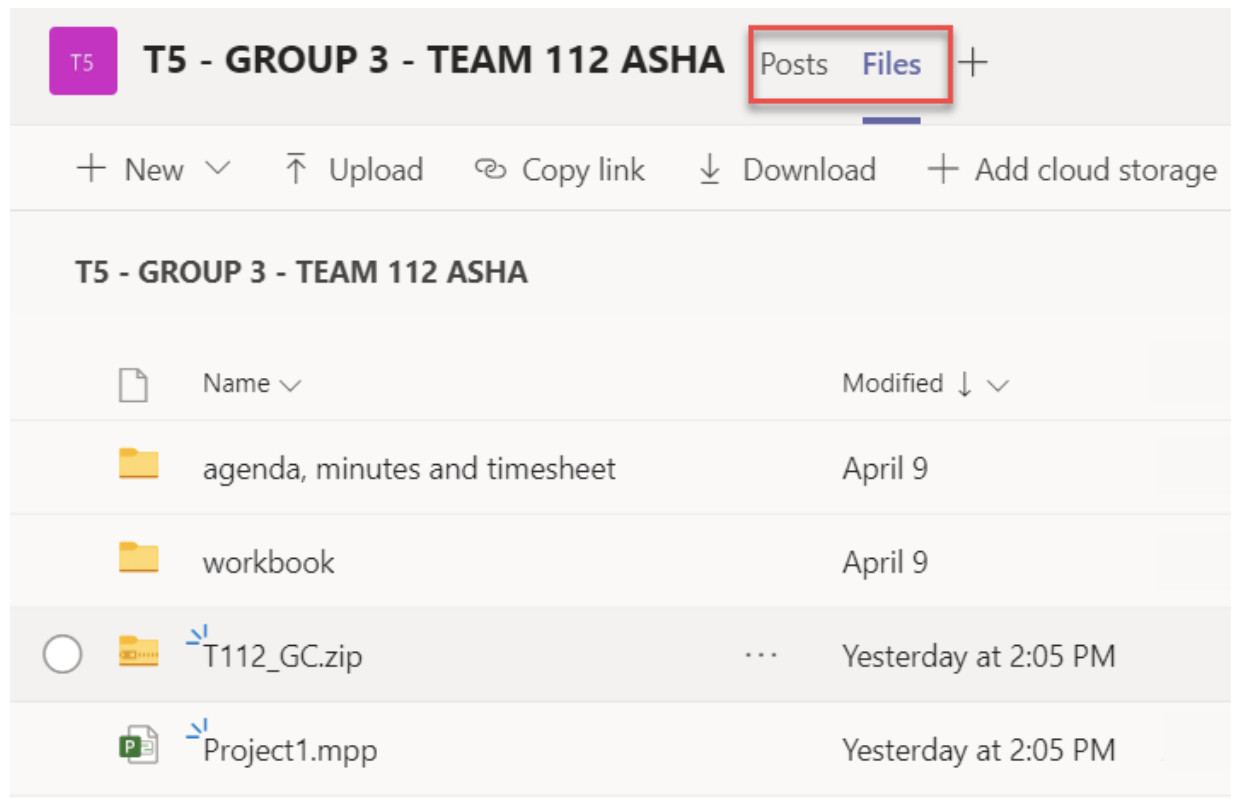
Image 4: Tabs for Posts and Files
Collaboration: Posts section was used by project team members as a common working space to collaborate with each other and organise small self-managed group meetings.
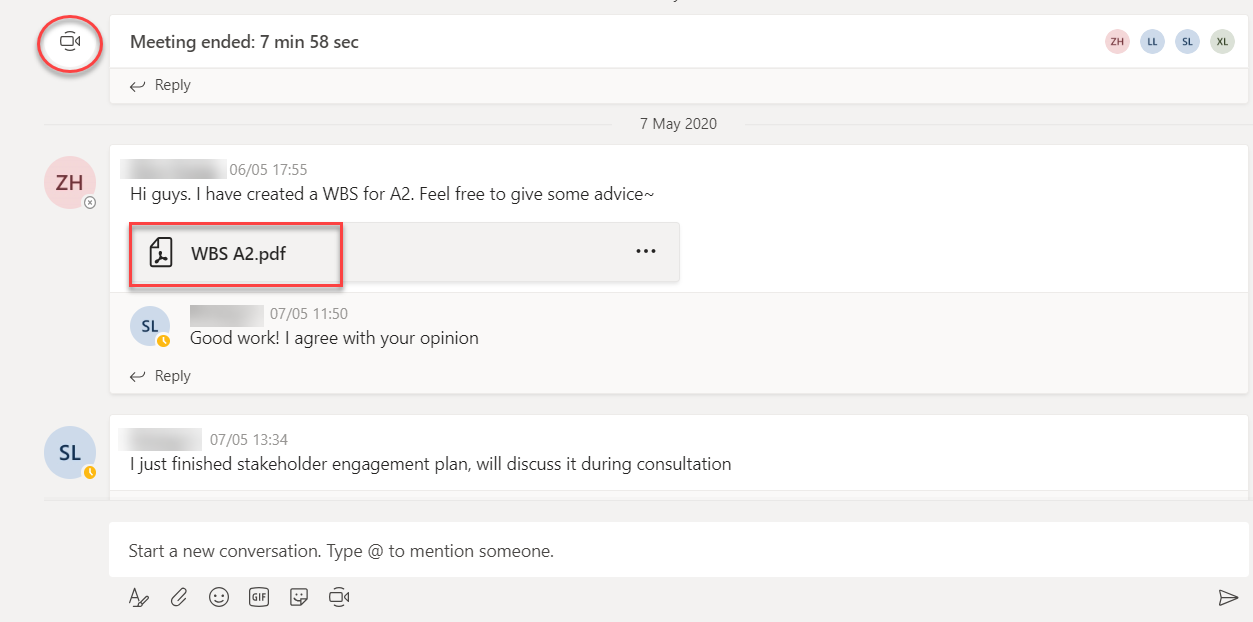
Image 5: Examples of collaboration between the students in Group 3
Communication with students: The channel tool provided the educator with one central point to communicate all the project-related details, with clear and concise instructions.
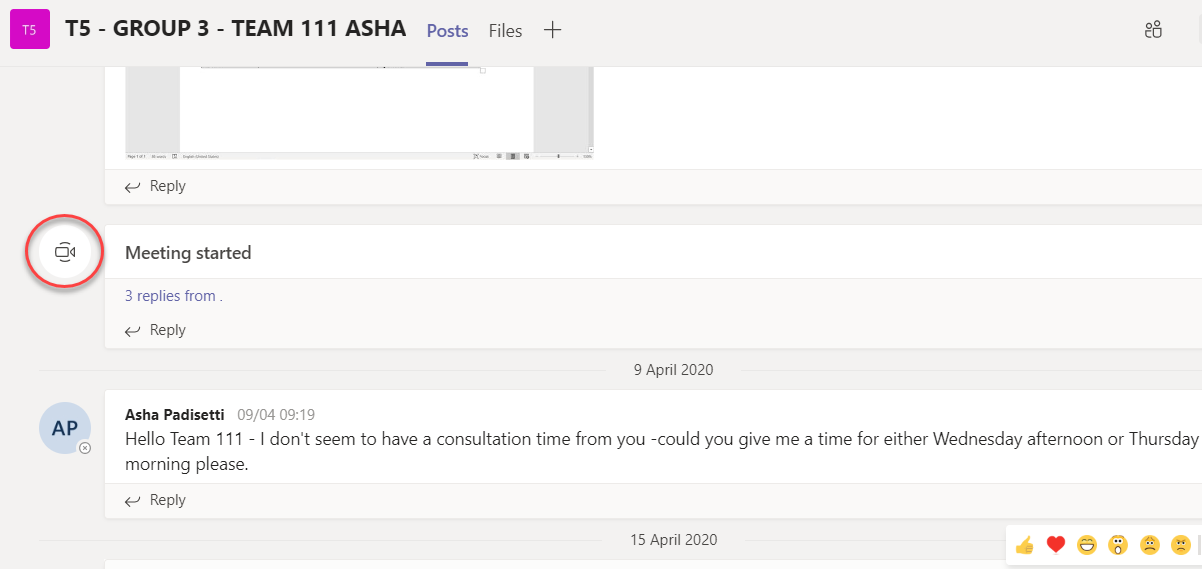
Image 6: In channel communication via posts
Recommendations
- Create a separate team for each tutorial
- Create channels for the different teams and encourage discussion on all project details
- Set up Posts for communication and Files for storing documents, resources and forms
- Provide clear instructions for students on how to communicate within MS Teams
Credits:
- Dr Chan Cheah, Faculty of Information Technology
- Ms Asha Padisetti, Teaching Associate
Feedback in action
Make your way through Incorporating Student Feedback and Enhancing Student Experience to learn how Monash University academics have used student feedback to amplify students’ voices and enhance their learning experience - these case studies demonstrate how actionable feedback can transform teaching and create a more responsive learning environment.
Supporting your students
View
Students often do not know how to effectively work in groups or teams, so supporting students to learn how to collaborate, and how to be collaborative, may require some work up front with students.
How to support your students
Setting up the group activity
- Develop clear guidelines and instructions about the activity. Let students know what they need to do and what the deadlines are.
- Provide technology support resources (see links below)
- Have clear marking guides or rubrics (quality of output)
- Set group work expectations (expected behavior)
- Team contracts can be used to get students to set their own expectations. Students can write these at the beginning of the teaching period, and evaluate at the end.
- Get students involved in setting the communication and collaboration strategies for their team.
- Set up Moodle submission based on marking criteria. If you are marking as a group or individually, these need to be set up in the activity and Gradebook.
- Have a mediation plan in place for any contingencies that may arise in groups, but use this as a last resort to give groups agency when managing issues.
Managing the group activity
- Clearly explain to students what they need to do for the task.
- Get students to discuss roles and responsibilities in the group.
- Set up specific times to connect with students and provide verbal guidance. You can use any of the following to do this.
- Use a Forum to address questions or get students to share their draft work for peer feedback.
- Zoom breakout rooms are a great way to check in on student progress
- Have regular short meetings with each group so that questions and queries can be addressed quickly and easily. This avoids lengthy back-and-forth email correspondence which can be time-consuming for both educators and students. You could use a scheduling tool integrated into Google Calendar for this.
- Build in opportunities to see projects at various stages of completion. The following tools can help you have an oversight over their progress.
- Google Docs and MS Teams can be used to see progress and provide feedback.
- Get students to use project management tools so that they can become accountable for their tasks within a team. You can let students know they can use the following for free to manage their projects and group work.
- Trello or Planner can be used to track who is doing what and when.
What resources and services are available to students
The following resources may be useful for educators to refer students to to help them work collaboratively:
LearnHQ: Collaborate with others
A suite of resources addressing the essentials of group and team work. They teach students how to set up a successful group, how to make it more effective, and how to manage group dynamics and behaviours.
Use Microsoft Teams for study groups
This resource will guide students to effectively use Microsoft Teams for online communication: create and manage teams, share screens, collaborate on whiteboards, participate in discussions and share files.
Faculty-specific resources on group and teamwork
The following resources produced by individual Monash faculties outline the pedagogical background, design, and delivery approaches for teamwork tasks, with specific focus on discipline needs.
Guidelines for Student Group Work - Faculty of IT
This guide, written for students, provides guidelines about student group work in the Faculty of Information Technology.
Guide for Working in a Team - Faculty of IT
This guide, written for students, provides strategies for students working in teams in the Faculty of Information Technology.
Working in a team - Faculty of Engineering
This guide, written for students, provides guidelines for working in groups and teams in the Faculty of Engineering.
Related resources
View
Group and peer assessment
View this resource to learn how to use collaborative activities to effectively develop and assess skills, knowledge and attributes.
Feedback
Learn to provide effective feedback within formative and summative assessment to improve student outcomes and learning.
Marking, grading and rubrics
Use this resource to support you in marking consistently through the appropriate application of criteria and moderation practices.
Academic integrity
Explore academic integrity principles, policies and procedures
Guidelines for Teaching with Student Teams - Monash Business School
This guide, written for staff, provides guidelines for managing group and team work in the Monash Business School.
Relevant policies & procedures
Monash has specific policies and procedures related to collaborative learning. Take the time to review these to inform your teaching practice.
Learning and teaching policy
This guide provides a clear and concise definition of academic integrity: The moral code of academia that involves using, generating and communicating information in an ethical, honest and responsible manner.
Assessment and academic integrity policy
This policy describes the principles of assessment at Monash University to maintain academic standards of student achievement, support students in their academic development and uphold standards of academic integrity.
Marking and feedback procedure
This procedure outlines processes and principles for marking, blind marking, second marking, double marking, provision of feedback, quality assurance, finalising results, responsibilities, and re-marking requests. It also details security and record keeping for marked assessments.
Education Performance Standards Framework
View
The Education Performance Standards identify the expectations of education practice at Monash – See the Education Performance Standards for more details.
Impact on student learning | Impact on educational knowledge | Impact on educational environment | |||||
Effective teaching and learning | Responsive program design | Student- centred orientation | Professional learning engagement | Pedagogical content knowledge | Education research performance | Education innovation | Education leadership |
✓ | ✓ | ✓ | ✓ | ||||
You could address these Practice Elements by providing evidence of how you:
- Plan appropriate group and team work learning activities and/or assessment
- Provide guidelines and resources to support students to develop collaboration skills
- Monitor and facilitate collaborative processes in your unit/s
- Design innovative approaches to teamwork projects, including online collaboration
- Embed student-centred learning within collaborative activities and/or assessments
- Align collaborative learning activities with the overall learning outcomes for your unit/s.